
Fortinet
NSE7_PBC-7.2 · Question #14
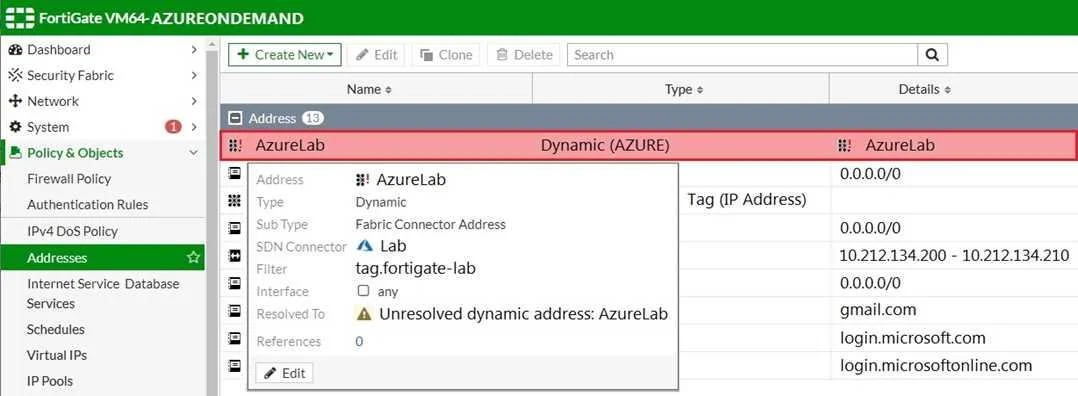
Refer to the exhibit. Your senior administrator successfully configured a FortiGate fabric connector with the Azure resource manager, and created a dynamic address object on the FortiGate VM to…
The correct answer is B. In the Microsoft Azure portal, set the correct tag values for the windows server. See the full explanation below for the reasoning.
Question
Refer to the exhibit. Your senior administrator successfully configured a FortiGate fabric connector with the Azure resource manager, and created a dynamic address object on the FortiGate VM to connect with a windows server in Microsoft Azure. However, there is now an error on the dynamic address object, and you must resolve the issue. How do you resolve this issue?
Exhibit
Options
- ARun diagnose debug application azd -l on FortiGate.
- BIn the Microsoft Azure portal, set the correct tag values for the windows server.
- CIn the Microsoft Azure portal, access the windows server, obtain the private IP address, and
- DDelete the address object and recreate a new address object with the type set to FQDN.
How the community answered
(43 responses)- A7% (3)
- B74% (32)
- C16% (7)
- D2% (1)
Community Discussion
No community discussion yet for this question.