
NSE7_PBC-7.2 · Question #56
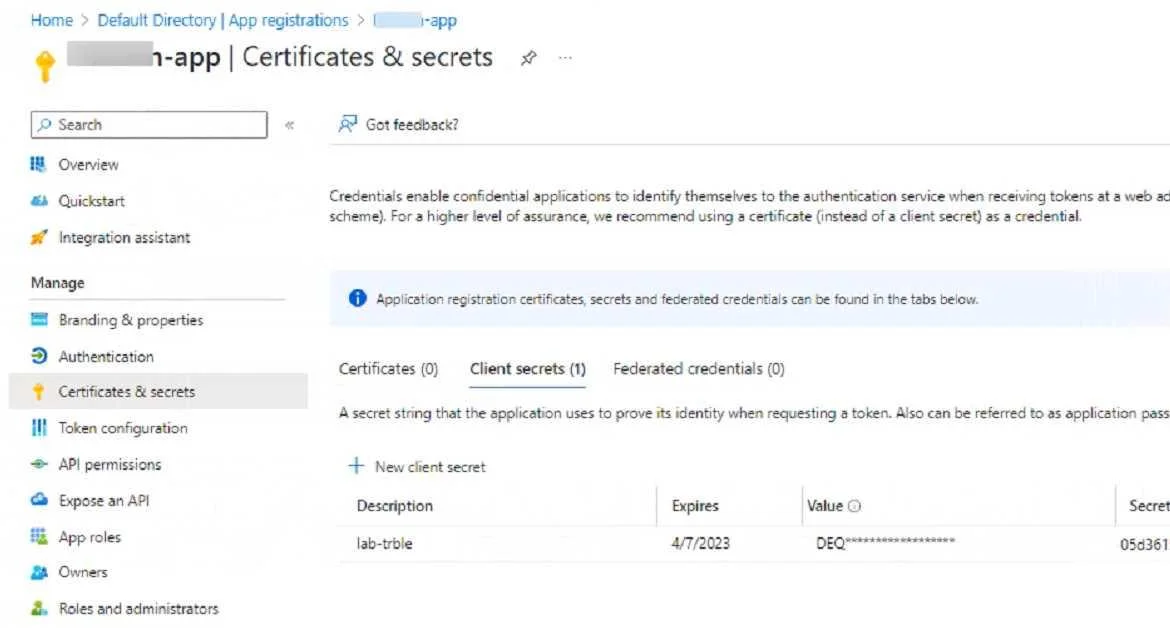
Refer to the exhibit. An administrator is trying to deploy a FortiGate VM in Microsoft Azure using Terraform. However, during the configuration, the Azure client secret is no longer visible in the…
The correct answer is C. The administrator can create a new client secret. The Azure client secret is a one-time value that is only visible when it is created. If the administrator loses or forgets the client secret, they cannot retrieve it from the Azure portal. However, they can create a new client secret and use it to configure Terraform. To create…
Question
Refer to the exhibit. An administrator is trying to deploy a FortiGate VM in Microsoft Azure using Terraform. However, during the configuration, the Azure client secret is no longer visible in the Azure portal. How would the administrator obtain the Azure client secret to configure on Terratorm?
Exhibit
Options
- AThe administrator must create a new Azure account
- BLog in to the Azure CLI with power user to obtain the client secret
- CThe administrator can create a new client secret
- DThe administrator must obtain the client secret through Azure Cloud Shell.
How the community answered
(31 responses)- A6% (2)
- B16% (5)
- C74% (23)
- D3% (1)
Explanation
The Azure client secret is a one-time value that is only visible when it is created. If the administrator loses or forgets the client secret, they cannot retrieve it from the Azure portal. However, they can create a new client secret and use it to configure Terraform. To create a new client secret, they need to follow these steps: Sign in to the Azure portal and navigate to the Azure Active Directory service. Select the application name under the App Registrations. Select Certificates & Secrets > New client secret to create a new client secret. Add a description and an expiration date for the client secret and select Add. Copy the value of the new client secret immediately as it will not be shown again.
Topics
Community Discussion
No community discussion yet for this question.