
NSE7_PBC-7.2 · Question #55
Refer to the exhibit. Consider the active-active load balance sandwich scenario in Microsoft Azure. What are two important facts in the active-active load balance sandwich scenario? (Choose two )
The correct answer is B. It is recommended to enable NAT on FortiGate policies. D. It supports session synchronization for handling asynchronous traffic. It is recommended to enable NAT on FortiGate policies. This is because the Azure load balancer uses a hash-based algorithm to distribute traffic to the FortiGate instances, and it relies on the source and destination IP addresses and ports of the packets. If NAT is not enabled…
Question
Refer to the exhibit. Consider the active-active load balance sandwich scenario in Microsoft Azure. What are two important facts in the active-active load balance sandwich scenario? (Choose two )
Exhibit
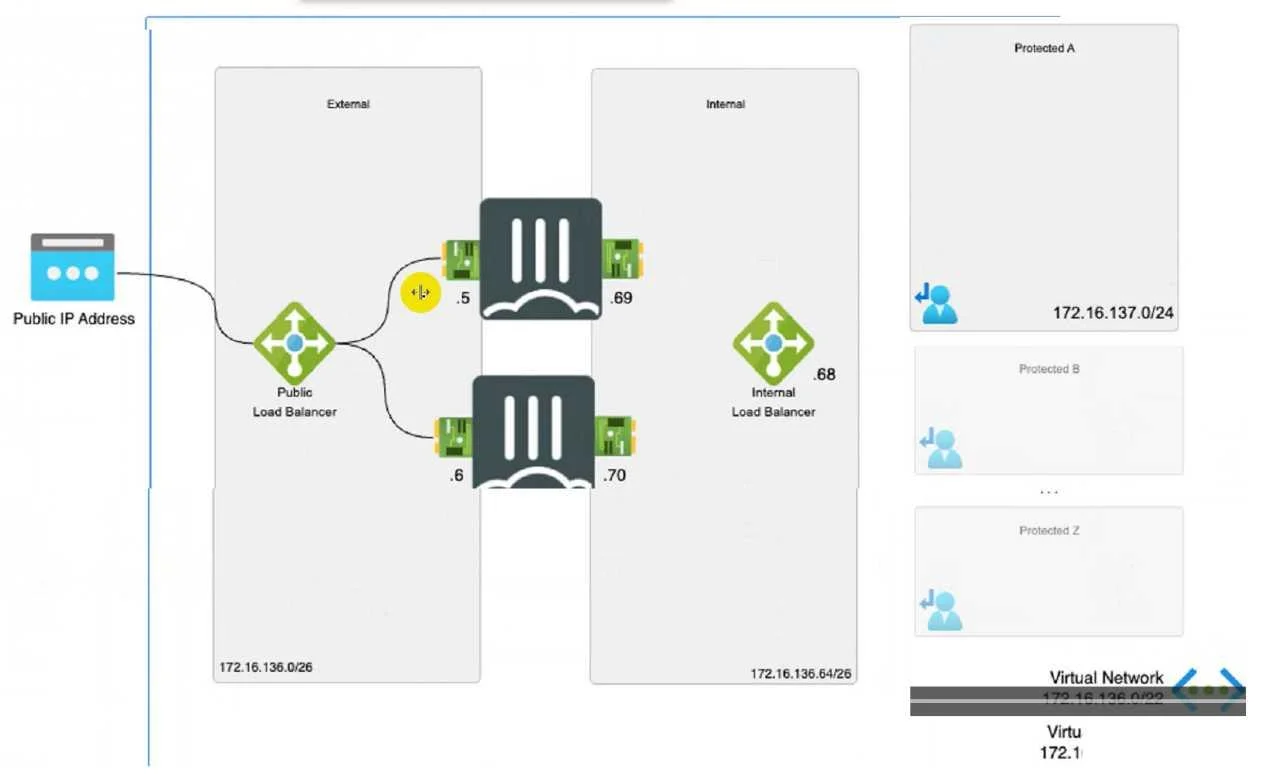
Options
- AIt uses the vdom-exception command to exclude the configuration from being synced
- BIt is recommended to enable NAT on FortiGate policies.
- CIt uses the FGCP protocol
- DIt supports session synchronization for handling asynchronous traffic.
How the community answered
(22 responses)- A18% (4)
- B73% (16)
- C9% (2)
Explanation
It is recommended to enable NAT on FortiGate policies. This is because the Azure load balancer uses a hash-based algorithm to distribute traffic to the FortiGate instances, and it relies on the source and destination IP addresses and ports of the packets. If NAT is not enabled, the source IP address of the packets will be the same as the load balancer's frontend IP address, which will result in uneven distribution of traffic and possible asymmetric routing issues. Therefore, it is recommended to enable NAT on the FortiGate policies to preserve the original source IP address of the packets and ensure optimal load balancing and routing. It supports session synchronization for handling asynchronous traffic. This means that the FortiGate instances can synchronize their session tables with each other, so that they can handle traffic that does not follow the same path as the initial packet of a session. For example, if a TCP SYN packet is sent to FortiGate A, but the TCP SYN-ACK packet is sent to FortiGate B, FortiGate B can forward the packet to FortiGate A by looking up the session table. This feature allows the FortiGate instances to handle asymmetric traffic that may occur due to the Azure load balancer's hash-based algorithm or other factors.
Topics
Community Discussion
No community discussion yet for this question.