
NSE4_FGT-7.0 · Question #19
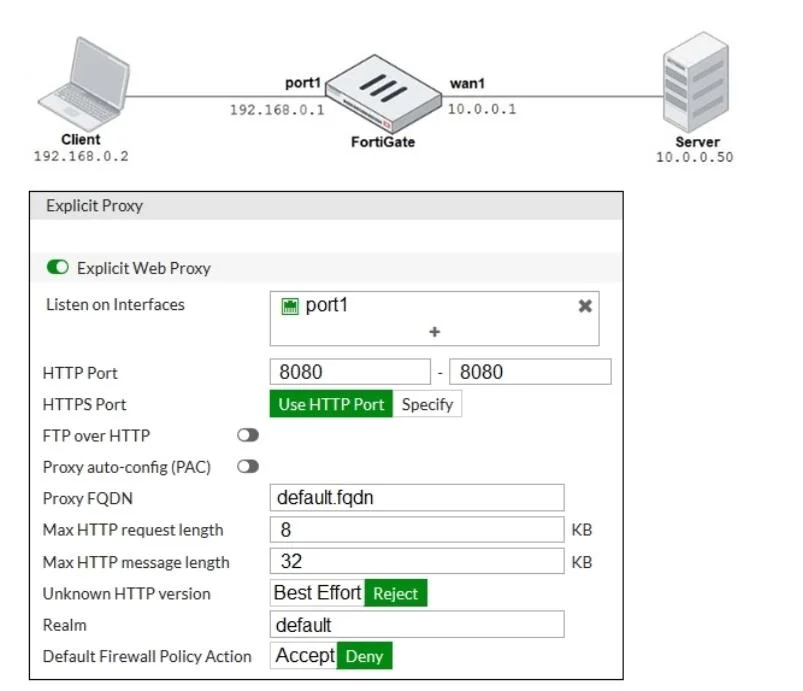
Refer to the exhibit. The exhibits show a network diagram and the explicit web proxy configuration. In the commanddiagnose sniffer packet, what filter can you use to capture the traffic between the…
The correct answer is A. `host 192.168.0.2 and port 8080'. To capture explicit web proxy traffic between the client and the FortiGate proxy, the diagnose sniffer packet filter must include the client's IP address and the explicit proxy's listening port.
Question
Refer to the exhibit. The exhibits show a network diagram and the explicit web proxy configuration. In the commanddiagnose sniffer packet, what filter can you use to capture the traffic between the client and the explicit web proxy?
Exhibit
Options
- A`host 192.168.0.2 and port 8080'
- B`host 10.0.0.50 and port 80'
- C`host 192.168.0.1 and port 80'
- D`host 10.0.0.50 and port 8080'
How the community answered
(49 responses)- A86% (42)
- B8% (4)
- C4% (2)
- D2% (1)
Why each option
To capture explicit web proxy traffic between the client and the FortiGate proxy, the `diagnose sniffer packet` filter must include the client's IP address and the explicit proxy's listening port.
The filter `host 192.168.0.2 and port 8080` correctly targets traffic where 192.168.0.2 is the client's IP address and 8080 is the standard listening port for an explicit web proxy on the FortiGate, thereby capturing the direct communication between the client and the proxy.
This filter specifies `host 10.0.0.50` and `port 80`, which would capture traffic between the explicit proxy and the destination web server, not between the client and the explicit proxy.
This filter specifies `host 192.168.0.1` and `port 80`; while 192.168.0.1 might be the FortiGate's interface, explicit proxies typically listen on port 8080, not 80, for client connections.
This filter specifies `host 10.0.0.50` (likely the web server) and `port 8080` (the proxy port), which is an incorrect combination for capturing the client-to-proxy segment of traffic.
Concept tested: FortiGate diagnose sniffer explicit proxy filter
Source: https://docs.fortinet.com/document/fortigate/7.4.0/fortios-cli-reference/109418/diagnose-sniffer-packet
Topics
Community Discussion
No community discussion yet for this question.