
NSE4_FGT-7.0 · Question #44
Refer to the exhibits. The SSL VPN connection fails when a user attempts to connect to it. What should the user do to successfully connect to SSL VPN?
The correct answer is A. Change the SSL VPN port on the client. The SSL VPN connection failure is likely due to a mismatch between the FortiGate's configured SSL VPN port and the port the client is attempting to connect to, requiring the user to change the SSL VPN port on their client.
Question
Refer to the exhibits. The SSL VPN connection fails when a user attempts to connect to it. What should the user do to successfully connect to SSL VPN?
Exhibit
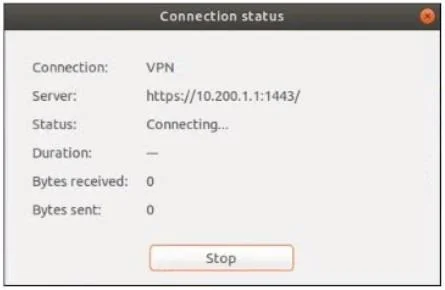
Options
- AChange the SSL VPN port on the client.
- BChange the Server IP address.
- CChange the idle-timeout.
- DChange the SSL VPN portal to the tunnel.
How the community answered
(45 responses)- A80% (36)
- B7% (3)
- C2% (1)
- D11% (5)
Why each option
The SSL VPN connection failure is likely due to a mismatch between the FortiGate's configured SSL VPN port and the port the client is attempting to connect to, requiring the user to change the SSL VPN port on their client.
The SSL VPN connection failure, especially if it's a "connection refused" type error, often indicates a mismatch between the port the SSL VPN server is listening on and the port the client is attempting to connect to. The exhibit would show the FortiGate SSL VPN configured on a specific port, and the client error would imply it's trying a different, incorrect port, necessitating a client-side port change.
Changing the server IP address on the client is typically unnecessary unless the initial IP address provided was completely wrong, which would usually result in a "host unreachable" or "DNS resolution failed" error.
Changing the idle-timeout setting on the FortiGate primarily affects how long inactive sessions are kept alive and does not directly resolve initial connection failures.
Changing the SSL VPN portal to the tunnel mode on the client is a configuration choice for how the VPN operates after connection, not a solution for initial connection failures.
Concept tested: SSL VPN client-server port matching
Source: https://docs.fortinet.com/document/forticlient/7.0.7/administration-guide/642998/ssl-vpn-connection
Topics
Community Discussion
No community discussion yet for this question.