
NSE4_FGT-7.0 · Question #151
Refer to the exhibit. A network administrator is troubleshooting an IPsec tunnel between two FortiGate devices. The administrator has determined that phase 1 fails to come up. The administrator has…
The correct answer is A. On HQ-FortiGate, set IKE mode to Main (ID protection). D. On Remote-FortiGate, set port2 as Interface. To resolve an IPsec Phase 1 failure, the IKE mode must match on both FortiGate devices, and the tunnel must be configured on the correct outgoing interface.
Question
Refer to the exhibit. A network administrator is troubleshooting an IPsec tunnel between two FortiGate devices. The administrator has determined that phase 1 fails to come up. The administrator has also re-entered the pre- shared key on both FortiGate devices to make sure they match. Based on the phase 1 configuration and the diagram shown in the exhibit, which two configuration changes will bring phase 1 up? (Choose two.)
Exhibit
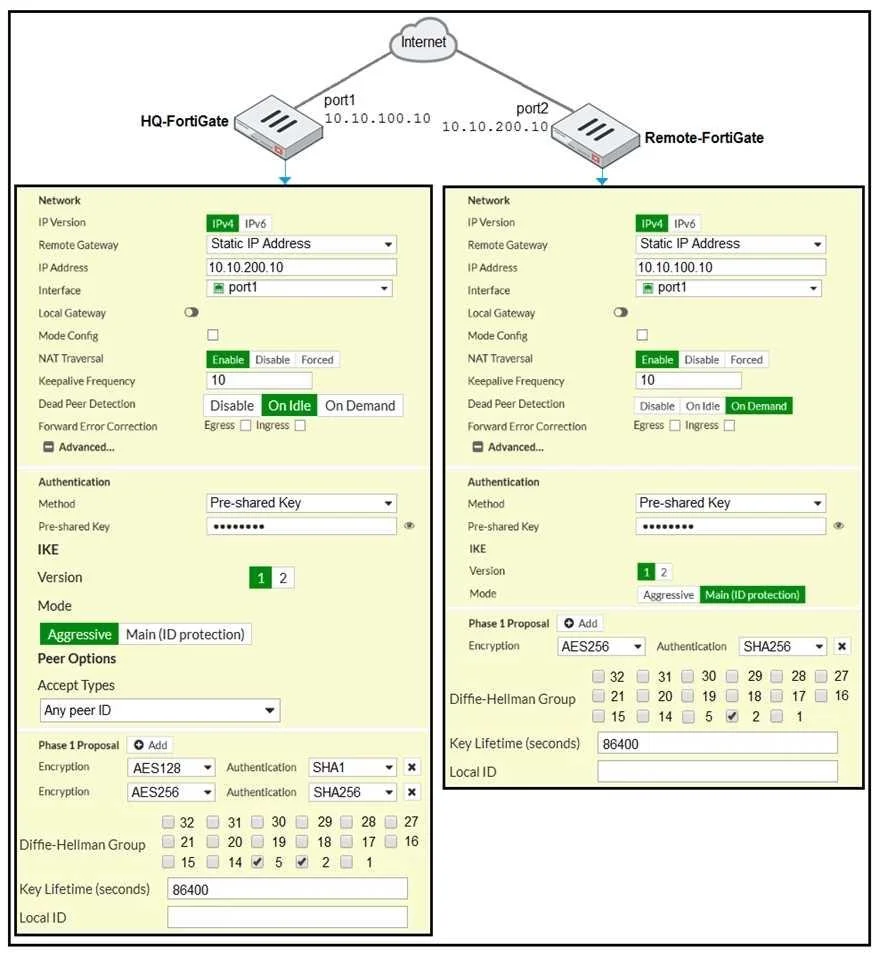
Options
- AOn HQ-FortiGate, set IKE mode to Main (ID protection).
- BOn both FortiGate devices, set Dead Peer Detection to On Demand.
- COn HQ-FortiGate, disable Diffie-Helman group 2.
- DOn Remote-FortiGate, set port2 as Interface.
How the community answered
(17 responses)- A59% (10)
- B29% (5)
- C12% (2)
Why each option
To resolve an IPsec Phase 1 failure, the IKE mode must match on both FortiGate devices, and the tunnel must be configured on the correct outgoing interface.
IKE modes (Main vs. Aggressive) must be identical on both FortiGate peers for Phase 1 to successfully establish. If HQ-FortiGate is in Aggressive mode and the remote peer expects Main mode, changing HQ-FortiGate to Main mode resolves this mismatch and enhances security with identity protection.
Dead Peer Detection (DPD) settings like On Demand affect the maintenance and re-establishment of an already established tunnel, not the initial Phase 1 negotiation and establishment.
While a Diffie-Hellman (DH) group mismatch can cause Phase 1 failure, simply disabling DH group 2 on HQ-FortiGate will not guarantee a fix unless the remote side explicitly requires a different group and DH group 2 was the only one enabled; the correct approach is to ensure matching DH groups.
The IPsec tunnel on Remote-FortiGate must be configured to use the correct physical interface (e.g., port2) that is connected to the internet or the remote peer. An incorrect interface selection will prevent the FortiGate from sending or receiving IKE negotiation packets, causing Phase 1 to fail.
Concept tested: IPsec Phase 1 negotiation - IKE mode and interface
Source: https://docs.fortinet.com/document/fortigate/7.4.0/administration-guide/765089/ipsec-vpn-troubleshooting
Topics
Community Discussion
No community discussion yet for this question.