
NSE4_FGT-7.0 · Question #131
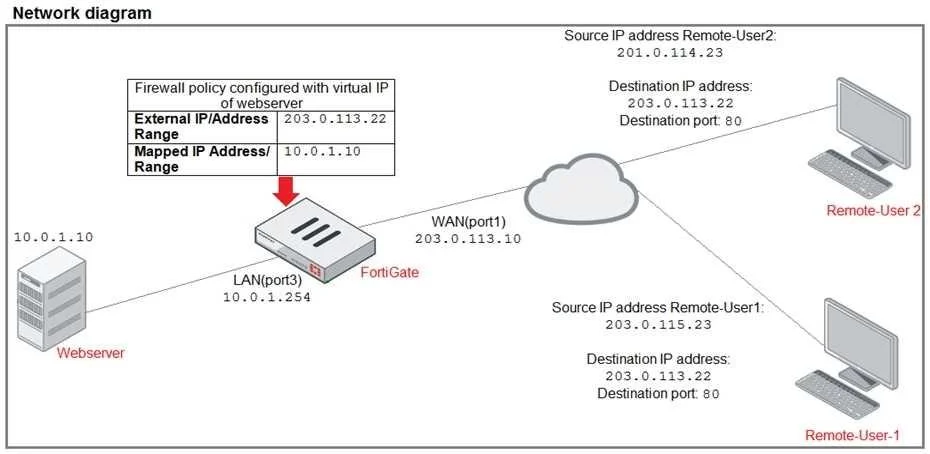
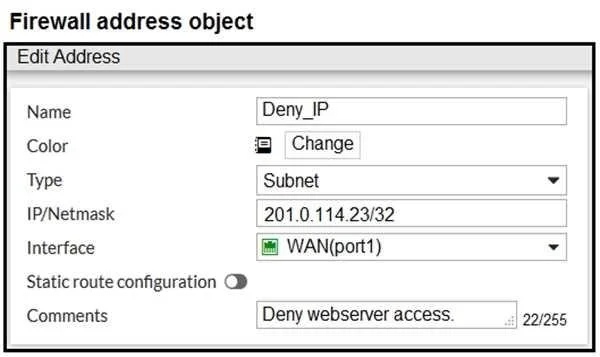
Refer to the exhibit. The exhibit contains a network diagram, firewall policies, and a firewall address object configuration. An administrator created a Deny policy with default settings to deny…
The correct answer is C. Enable match vip in the Deny policy. D. Set the Destination address as Web_server in the Deny policy. To deny Remote-user2 access to the Webserver, the administrator must ensure the Deny policy correctly targets the Webserver and handles traffic that may be traversing a Virtual IP.
Question
Refer to the exhibit. The exhibit contains a network diagram, firewall policies, and a firewall address object configuration. An administrator created a Deny policy with default settings to deny Webserver access for Remote-user2. Remote-user2 is still able to access Webserver. Which two changes can the administrator make to deny Webserver access for Remote-User2? (Choose two.)
Exhibits

Options
- ADisable match-vip in the Deny policy.
- BSet the Destination address as Deny_IP in the Allow-access policy.
- CEnable match vip in the Deny policy.
- DSet the Destination address as Web_server in the Deny policy.
How the community answered
(47 responses)- A23% (11)
- B11% (5)
- C66% (31)
Why each option
To deny Remote-user2 access to the Webserver, the administrator must ensure the Deny policy correctly targets the Webserver and handles traffic that may be traversing a Virtual IP.
Disabling `match-vip` would prevent the Deny policy from matching traffic that has been destination-NAT'd by a VIP if the policy's destination is the internal server IP.
Changing the destination in the `Allow-access` policy would not fix the `Deny` policy's ineffectiveness and could disrupt other legitimate access.
Enabling `match-vip` in the Deny policy allows it to match traffic after a Virtual IP (VIP) has performed destination network address translation (DNAT), directing the policy to evaluate the internal Webserver address.
Setting the destination address of the Deny policy to `Web_server` ensures that the policy specifically targets traffic destined for the Webserver, which is necessary for the denial to be effective.
Concept tested: FortiGate policy matching logic with VIPs and destination objects
Source: https://docs.fortinet.com/document/fortigate/7.4.0/administration-guide/468840/virtual-ip
Topics
Community Discussion
No community discussion yet for this question.