
NSE4_FGT-7.0 · Question #117
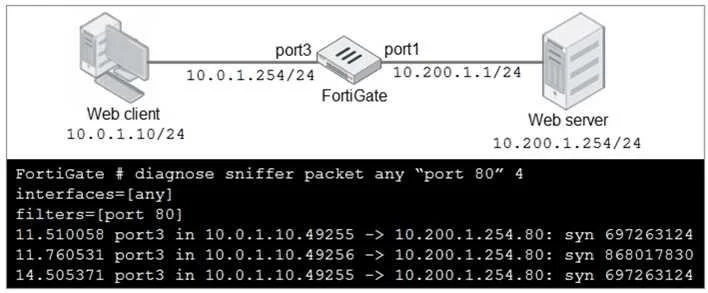
Refer to the exhibit. In the network shown in the exhibit, the web client cannot connect to the HTTP web server. The administrator runs the FortiGate built-in sniffer and gets the output as shown in…
The correct answer is D. Execute a debug flow. If a FortiGate sniffer shows traffic leaving the device but a connection fails, the next troubleshooting step should be to execute a debug flow to analyze the internal packet processing and identify any specific drops or modifications.
Question
Refer to the exhibit. In the network shown in the exhibit, the web client cannot connect to the HTTP web server. The administrator runs the FortiGate built-in sniffer and gets the output as shown in the exhibit. What should the administrator do next to troubleshoot the problem?
Exhibit
Options
- ARun a sniffer on the web server.
- BCapture the traffic using an external sniffer connected to port1.
- CExecute another sniffer in the FortiGate, this time with the filter "host 10.0.1.10"
- DExecute a debug flow.
How the community answered
(36 responses)- A14% (5)
- B6% (2)
- C22% (8)
- D58% (21)
Why each option
If a FortiGate sniffer shows traffic leaving the device but a connection fails, the next troubleshooting step should be to execute a debug flow to analyze the internal packet processing and identify any specific drops or modifications.
Running a sniffer on the web server might be useful later, but the FortiGate's internal processing is the immediate unknown, as the FortiGate sniffer already indicates the packet is leaving the device.
Capturing traffic with an external sniffer on port1 would replicate what the FortiGate's built-in sniffer already shows (traffic exiting FortiGate), so it wouldn't provide new insights into FortiGate's internal handling.
Executing another sniffer with the filter 'host 10.0.1.10' is redundant since the initial sniffer likely already shows this traffic and a debug flow would offer much deeper insight into *why* the traffic is failing, rather than just *if* it's present.
The FortiGate sniffer output shows traffic exiting port1 towards the web server, indicating the FortiGate is forwarding the packet. If the web client still cannot connect, a debug flow provides detailed internal processing steps, including policy matching, NAT, route lookups, and any security features that might be dropping or altering the packet, which is essential to determine why the connection fails despite the packet exiting the FortiGate.
Concept tested: FortiGate troubleshooting with debug flow
Source: https://docs.fortinet.com/document/fortigate/7.4.0/fortios-handbook/955288/packet-flow-debugging
Topics
Community Discussion
No community discussion yet for this question.