
NSE4 · Question #117
An end user logs into the full-access SSL VPN portal and selects the Tunnel Mode option by clicking on the "Connect" button. The administrator has enabled split tunneling. Given that the user…
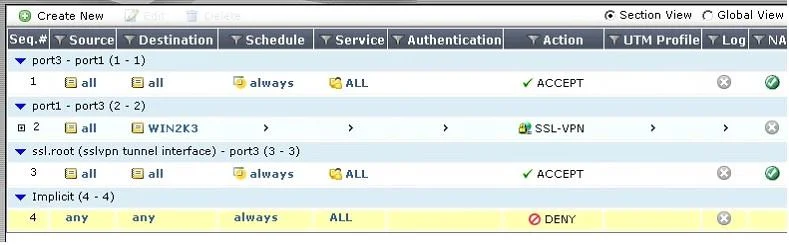
The correct answer is A. A route to destination matching the `WIN2K3' address object. With split tunneling enabled in an SSL VPN, the client's routing table receives a specific route only for the destination networks defined in the SSL VPN policy, like an address object.
Question
An end user logs into the full-access SSL VPN portal and selects the Tunnel Mode option by clicking on the "Connect" button. The administrator has enabled split tunneling. Given that the user authenticates against the SSL VPN policy shown in the image below, which statement below identifies the route that is added to the client's routing table.
Exhibit
Options
- AA route to destination matching the `WIN2K3' address object.
- BA route to the destination matching the `all' address object.
- CA default route.
- DNo route is added.
How the community answered
(40 responses)- A83% (33)
- B5% (2)
- C10% (4)
- D3% (1)
Why each option
With split tunneling enabled in an SSL VPN, the client's routing table receives a specific route only for the destination networks defined in the SSL VPN policy, like an address object.
When split tunneling is enabled, the client's routing table receives a specific route for the destination defined in the SSL VPN policy (e.g., the `WIN2K3` address object) to direct traffic for that network through the VPN tunnel.
A route to the `all` address object would imply full tunneling, where all traffic goes through the VPN, contradicting the enablement of split tunneling.
A default route would also imply full tunneling, directing all internet-bound traffic through the VPN, which is contrary to split tunneling.
If split tunneling is enabled and a destination is specified in the policy, a route will be added to the client; thus, 'no route is added' is incorrect.
Concept tested: SSL VPN split tunneling client routes
Source: https://docs.fortinet.com/document/fortigate/7.4.0/administration-guide/181555/ssl-vpn-modes
Topics
Community Discussion
No community discussion yet for this question.