
NCP-MCA · Question #71
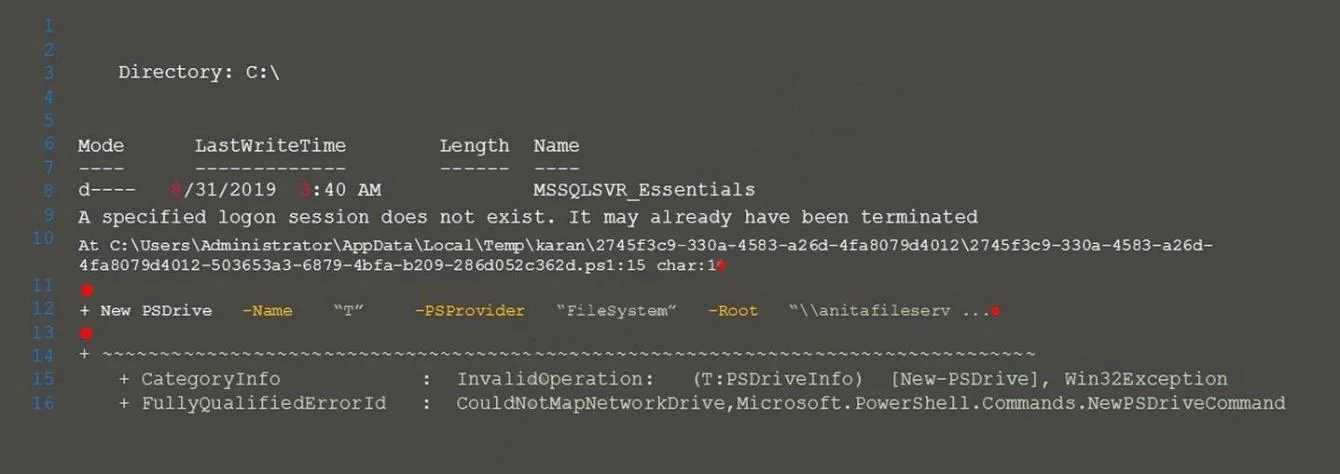
Refer to the exhibit. Calm encountered the error shown in the exhibit when importing a script that maps a network drive. Upon further investigation, the Calm administrator was unable to run the…
The correct answer is B. Enable-WSManCredSSP -Role Client. The error message indicates that the script failed to authenticate to the remote server using CredSSP. CredSSP is a security mechanism that allows a client to delegate its credentials to a remote server for authentication. To use CredSSP, both the client and the server need to…
Question
Refer to the exhibit. Calm encountered the error shown in the exhibit when importing a script that maps a network drive. Upon further investigation, the Calm administrator was unable to run the script manually on a VM and discovered that elevated permissions were needed. Which command should the administrator add to the script?
Exhibit
Options
- AEnable-WSManCredSSP -Role Server -Force
- BEnable-WSManCredSSP -Role Client
- CEnable-WSManCredSSP -Role Server
- DDisable-WSManCredSSP -Role Server -Force
How the community answered
(18 responses)- A11% (2)
- B78% (14)
- C6% (1)
- D6% (1)
Explanation
The error message indicates that the script failed to authenticate to the remote server using CredSSP. CredSSP is a security mechanism that allows a client to delegate its credentials to a remote server for authentication. To use CredSSP, both the client and the server need to enable it and configure the role and the trusted hosts. The command Enable-WSManCredSSP -Role Client enables CredSSP on the client side and specifies the remote server as a trusted host. This command should be added to the script before invoking the Invoke-Command cmdlet that runs the script block on the remote server. The other commands are either irrelevant or incorrect for
Topics
Community Discussion
No community discussion yet for this question.