
NCP-MCA · Question #74
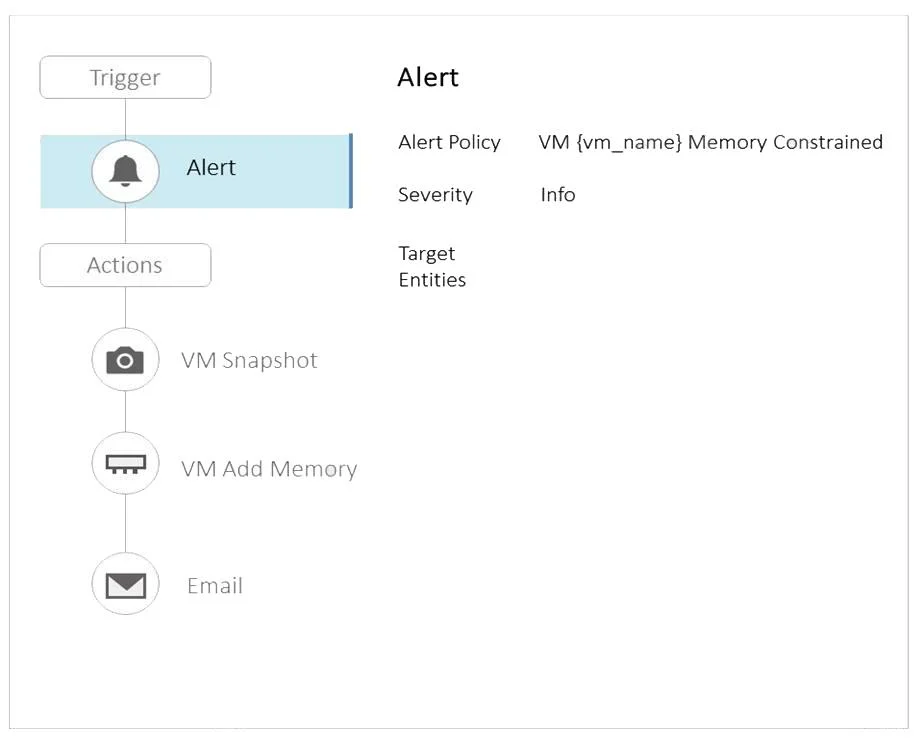
Refer to the exhibit. The VM appSAP01dev is a SAP development environment application and it is common to have memory constrained alerts on this VM, but the administrator wants to avoid adding…
The correct answer is B. Modify the Alert by adding the correct category D. Assign the category Environment:Development to development VMs. The administrator should modify the alert by adding the correct category and assign the category Environment:Development to development VMs. By doing this, they can filter out alerts for development VMs that are expected to have memory constrained alerts and focus on those that…
Question
Refer to the exhibit. The VM appSAP01dev is a SAP development environment application and it is common to have memory constrained alerts on this VM, but the administrator wants to avoid adding memory to development VMs like this one, since this is normally done for only production VMs. Which two actions should the administrator take to avoid adding memory to the development VMs? (Choose two.)
Exhibit
Options
- AAssign the category Environment:Production to the production VMs
- BModify the Alert by adding the correct category
- CDisable the Alert in Prism Central
- DAssign the category Environment:Development to development VMs
How the community answered
(38 responses)- A16% (6)
- B76% (29)
- C8% (3)
Explanation
The administrator should modify the alert by adding the correct category and assign the category Environment:Development to development VMs. By doing this, they can filter out alerts for development VMs that are expected to have memory constrained alerts and focus on those that are critical, such as production VMs. This is based on the general practices in managing alerts in a multicloud environment, as well as the specific features and requirements of Nutanix Calm and
Topics
Community Discussion
No community discussion yet for this question.