
NCP-MCA · Question #46
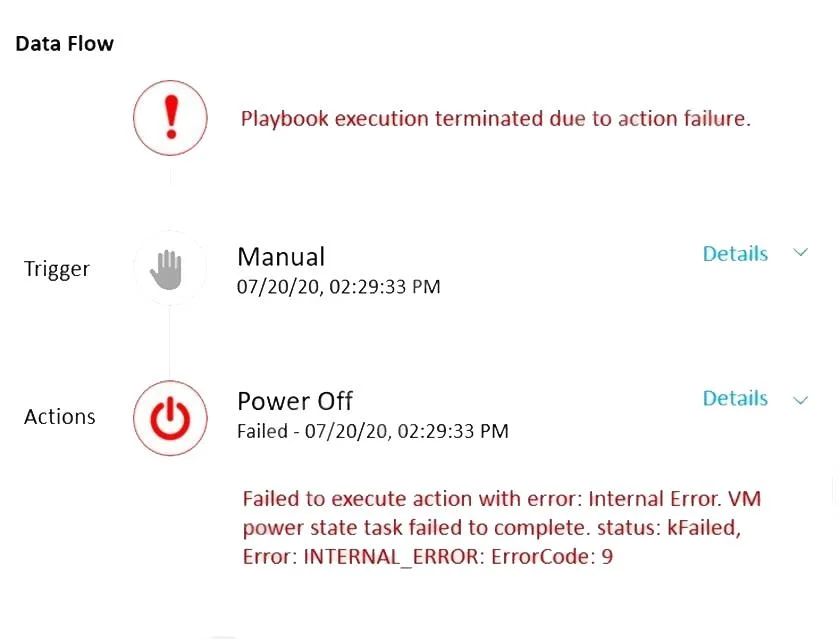
Refer to the exhibit. A subset of Linux VMs are required to be gracefully shutdown each evening. A Playbook is created to shutdown the targeted VMs, however the error message shown in the exhibit is…
The correct answer is D. The SSH Service is not running on the VMs. According to the Nutanix Multicloud Automation Administration (NMCAA) course1, one of the prerequisites for using X-Play to automate tasks on VMs is to have SSH enabled and configured on the target VMs. This allows X-Play to connect to the VMs and execute commands or scripts…
Question
Refer to the exhibit. A subset of Linux VMs are required to be gracefully shutdown each evening. A Playbook is created to shutdown the targeted VMs, however the error message shown in the exhibit is displayed when the Playbook is executed. What is causing the error message?
Exhibit
Options
- AUser executing the Playbook does not have Admin privileges.
- BThe VM is already powered off.
- CThe VM is missing Nutanix Guest Tools.
- DThe SSH Service is not running on the VMs.
How the community answered
(34 responses)- A9% (3)
- B6% (2)
- C3% (1)
- D82% (28)
Explanation
According to the Nutanix Multicloud Automation Administration (NMCAA) course1, one of the prerequisites for using X-Play to automate tasks on VMs is to have SSH enabled and configured on the target VMs. This allows X-Play to connect to the VMs and execute commands or scripts remotely. If the SSH service is not running on the VMs, then X-Play will fail to connect and perform the actions, resulting in the error message shown in the exhibit. The other options are not likely to cause this error, as they are either unrelated to X-Play (A and B) or not required for X-
Topics
Community Discussion
No community discussion yet for this question.