
Microsoft
MS-900 · Question #219
Hotspot Question For each of the following statements, select Yes if the statement is true. Otherwise, select No. NOTE: Each correct selection is worth one point. Answer:
All three statements are correct because Microsoft 365 sensitivity labels fully support encryption, granular access control (permissions), and visual content markings like watermarks.
Submitted by tarun92· Mar 5, 2026Describe security, compliance, privacy, and trust in Microsoft 365
Question
Hotspot Question For each of the following statements, select Yes if the statement is true. Otherwise, select No. NOTE: Each correct selection is worth one point. Answer:
Exhibit
Answer Area
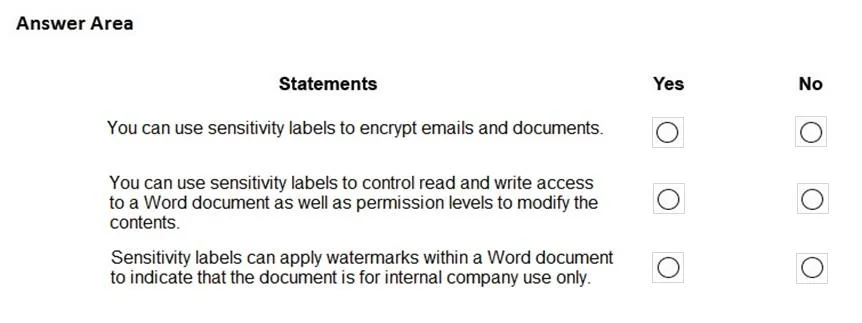
- You can use sensitivity labels to encrypt emails and documents.
- You can use sensitivity labels to control read and write access to a Word document as well as permission levels to modify the contents.
- Sensitivity labels can apply watermarks within a Word document to indicate that the document is for internal company use only.
Explanation
All three statements are correct because Microsoft 365 sensitivity labels fully support encryption, granular access control (permissions), and visual content markings like watermarks.
Approach. Select 'Yes' for all three statements.
- Encrypt emails and documents: Yes. Sensitivity labels can be configured to apply encryption to protect content from unauthorized access.
- Control read/write access and permission levels: Yes. By leveraging Rights Management, sensitivity labels allow administrators to assign specific usage rights (e.g., View Only, Reviewer, Co-Author) to specific users or groups.
- Apply watermarks: Yes. Content marking is a core feature, allowing the automatic addition of watermarks, headers, or footers to classify and visually restrict documents.
Common mistakes.
- common_mistake. Selecting 'No' for any statement typically results from confusing sensitivity labels with simple metadata tags. In Microsoft Purview, sensitivity labels are active enforcement mechanisms that can simultaneously tag, encrypt, restrict access, and visibly mark documents.
Concept tested. Microsoft Purview Information Protection - Capabilities of Sensitivity Labels
Reference. https://learn.microsoft.com/en-us/microsoft-365/compliance/sensitivity-labels
Topics
#sensitivity labels#encryption#access control#watermarks
Community Discussion
No community discussion yet for this question.