
MS-900 · Question #221
Drag and Drop Question A company uses Microsoft 365. You need to identify the appropriate report for each definition. Which report should you choose for each definition? To answer, drag the…
The correct answer is Threat Protection Status; Malware Detections; Discover Shadow IT. The Threat Protection Status report aggregates data about malicious content and phishing attempts blocked by Exchange Online Protection and Defender for Office 365, making it ideal for tracking threats over time. The Malware Detections report specifically shows email messages…
Question
Exhibit
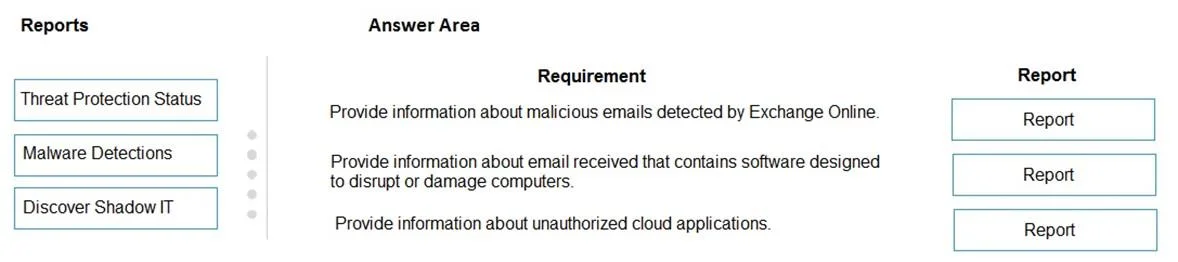
Answer Area
Drag items
Correct arrangement
- Threat Protection Status
- Malware Detections
- Discover Shadow IT
Explanation
The Threat Protection Status report aggregates data about malicious content and phishing attempts blocked by Exchange Online Protection and Defender for Office 365, making it ideal for tracking threats over time. The Malware Detections report specifically shows email messages detected as containing malware, providing a focused view of malware incidents in the organization. The Discover Shadow IT report (found in Microsoft Defender for Cloud Apps) is used to identify unsanctioned cloud applications being used by employees, helping organizations manage unauthorized app usage.
Topics
Community Discussion
No community discussion yet for this question.