
MS-900 · Question #218
Hotspot Question For each of the following statements, select Yes if the statement is true. Otherwise, select No. NOTE: Each correct selection is worth one point. Answer:
The correct answer is Multi-factor authentication (MFA) supports single sign-on by allowing a user to access Microsoft 365 services using only a username and password. = No; MFA-enabled accounts can be compromised with only a stolen user name and password. = No; MFA protects against brute-force attacks. = Yes. This question evaluates the understanding of Multi-factor Authentication (MFA) principles, specifically its definition, its role in preventing unauthorized access via stolen credentials, and its defense against password-based attacks.
Question
Exhibit
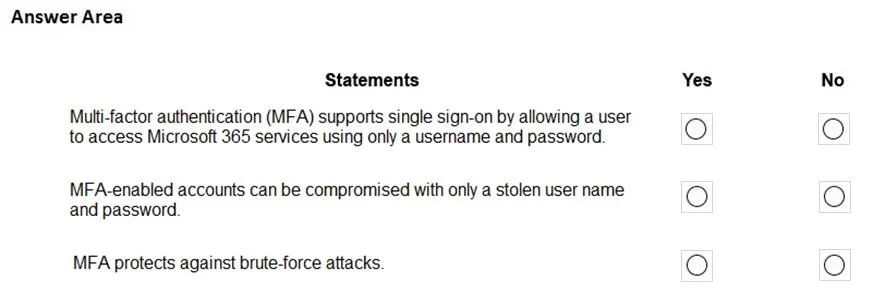
Answer Area
- Multi-factor authentication (MFA) supports single sign-on by allowing a user to access Microsoft 365 services using only a username and password.No
- MFA-enabled accounts can be compromised with only a stolen user name and password.No
- MFA protects against brute-force attacks.Yes
Explanation
This question evaluates the understanding of Multi-factor Authentication (MFA) principles, specifically its definition, its role in preventing unauthorized access via stolen credentials, and its defense against password-based attacks.
Approach. 1. 'Multi-factor authentication (MFA) supports single sign-on by allowing a user to access Microsoft 365 services using only a username and password.' -> Select No. By definition, MFA requires at least two different forms of authentication (e.g., something you know and something you have). Relying 'only' on a username and password is Single-Factor Authentication, not MFA. 2. 'MFA-enabled accounts can be compromised with only a stolen user name and password.' -> Select No. The primary purpose of MFA is to add a layer of security so that compromised passwords are not enough to breach an account. An attacker would also need access to the user's secondary factor (like a mobile device or security key). 3. 'MFA protects against brute-force attacks.' -> Select Yes. Even if an attacker successfully guesses or brute-forces a user's password, they will be stopped at the MFA prompt because they do not possess the secondary physical device or biometric factor required to complete the sign-in.
Common mistakes.
- common_mistake. A common mistake for the first statement is confusing Single Sign-On (SSO) with authentication strength; while SSO reduces login frequency, MFA still dictates how that login occurs (requiring multiple factors). For the second statement, a candidate might fail to understand that MFA renders a standalone stolen password useless for direct access.
Concept tested. Multi-factor Authentication (MFA) Fundamentals and Threat Mitigation
Reference. https://learn.microsoft.com/en-us/entra/identity/authentication/concept-mfa-howitworks
Topics
Community Discussion
No community discussion yet for this question.