
MS-721 · Question #12
Case Study 2 - Contoso Overview General Overview The network contains an Active Directory forest named contoso.com that syncs to Microsoft 365 by using Azure AD Connect. Domain controllers run…
To enable a user for Microsoft 365 Phone System with a specific voice routing policy from an on-premises Skype for Business deployment, the correct sequence involves assigning the Phone System license, migrating the user online, enabling enterprise voice, and then assigning the…
Question
Exhibit
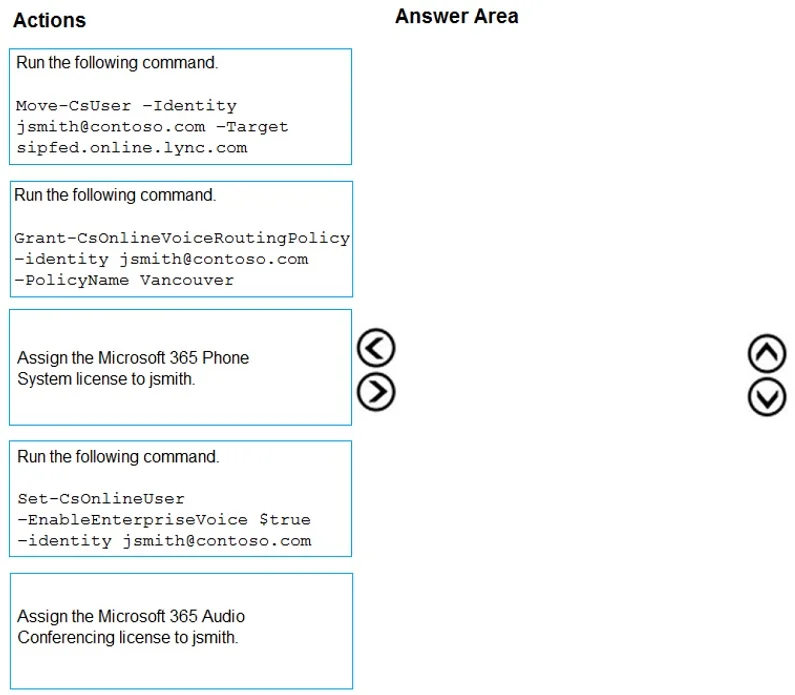
Answer Area
Explanation
To enable a user for Microsoft 365 Phone System with a specific voice routing policy from an on-premises Skype for Business deployment, the correct sequence involves assigning the Phone System license, migrating the user online, enabling enterprise voice, and then assigning the voice routing policy.
Approach. The goal is to enable user 'jsmith' for Microsoft 365 Phone System and assign the 'Vancouver' voice routing policy, considering the user is currently on an on-premises Skype for Business Server 2015 deployment. The correct interaction involves dragging the following four actions into the 'Answer Area' and ordering them as follows:
-
Assign the Microsoft 365 Phone System license to jsmith.
- Reasoning: A Phone System license is a fundamental prerequisite for a user to utilize Microsoft Teams Phone System features, including making and receiving calls and applying voice routing policies. Without this license, subsequent configuration steps related to Phone System will not function.
-
Run the following command. Move-CsUser -Identity [email protected] -Target sipfed.online.lync.com
- Reasoning: The scenario states 'Contoso uses a centralized Skype for Business Server 2015 deployment,' meaning jsmith is homed on-premises. To leverage Microsoft 365 Phone System (Teams Phone System), the user must be migrated from the on-premises Skype for Business environment to the online environment. The
Move-CsUsercmdlet is used for this hybrid migration, moving the user to Skype for Business Online (which for voice capabilities, effectively means provisioning them for Teams).
- Reasoning: The scenario states 'Contoso uses a centralized Skype for Business Server 2015 deployment,' meaning jsmith is homed on-premises. To leverage Microsoft 365 Phone System (Teams Phone System), the user must be migrated from the on-premises Skype for Business environment to the online environment. The
-
Run the following command. Set-CsOnlineUser -EnableEnterpriseVoice $true -identity [email protected]
- Reasoning: After the user has been moved to the online environment, their Enterprise Voice capabilities need to be explicitly enabled within Microsoft 365. This cmdlet provisions the user for voice services in the cloud, allowing them to make and receive calls.
-
Run the following command. Grant-CsOnlineVoiceRoutingPolicy -identity [email protected] -PolicyName Vancouver
- Reasoning: Once Enterprise Voice is enabled, the specific 'Vancouver' online voice routing policy needs to be assigned to the user. This policy dictates how inbound and outbound calls for jsmith are routed, which is essential for Direct Routing or specific calling plan configurations.
Common mistakes.
- common_mistake. A common mistake is selecting the 'Assign the Microsoft 365 Audio Conferencing license to jsmith.' action. This license is for scheduling and participating in audio conferences, not for direct Phone System calling capabilities, and is therefore not relevant to enabling a user for Phone System with a voice routing policy. Another mistake would be to apply the commands in an incorrect order. For example, trying to run
Set-CsOnlineUserorGrant-CsOnlineVoiceRoutingPolicybeforeMove-CsUserwould target an on-premises user with online-specific commands, leading to failure or incorrect configuration. Similarly, not assigning the Phone System license first would prevent the necessary features from being provisioned.
Concept tested. Microsoft Teams Phone System user provisioning in a hybrid Skype for Business environment, including licensing, user migration from on-premises to online, enabling enterprise voice, and applying online voice routing policies (often for Direct Routing).
Topics
Community Discussion
No community discussion yet for this question.