
MS-721 · Question #115
Drag and Drop Question Your company has Microsoft 365 E1 licenses. The company is based in the USA and uses Teams for communication. The CEO of the company wants users to be able to call numbers of…
The correct answer is Purchase a Phone System add-on license.; Purchase a Domestic and International Calling Plan.; Obtain phone numbers for the company's users through the Teams admin center.; Instruct the users to check their Teams environments. To enable international calling in Microsoft Teams for E1 license holders, you must first purchase a Phone System add-on, then an international calling plan, obtain phone numbers, and finally, instruct users to verify functionality.
Question
Exhibit
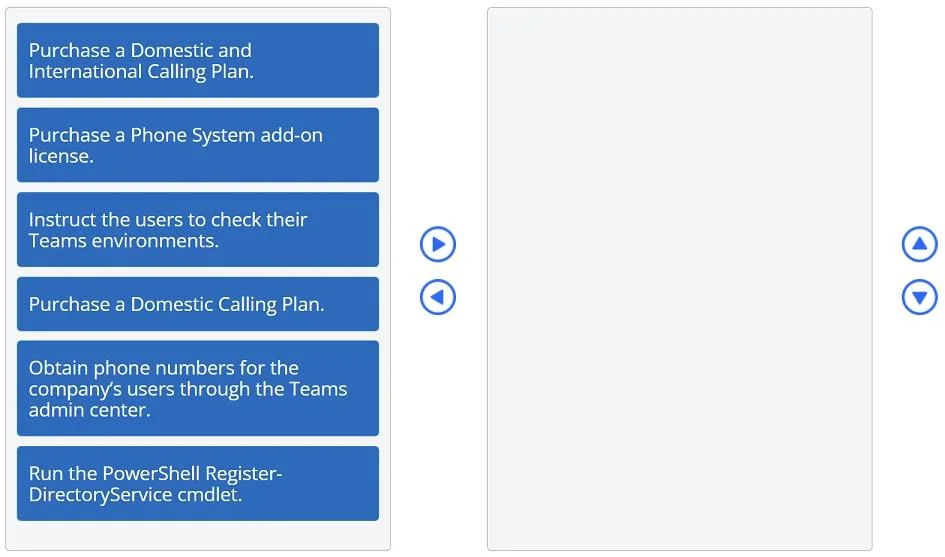
Answer Area
Drag items
Correct arrangement
- Purchase a Phone System add-on license.
- Purchase a Domestic and International Calling Plan.
- Obtain phone numbers for the company's users through the Teams admin center.
- Instruct the users to check their Teams environments.
Explanation
To enable international calling in Microsoft Teams for E1 license holders, you must first purchase a Phone System add-on, then an international calling plan, obtain phone numbers, and finally, instruct users to verify functionality.
Approach. The correct interaction involves dragging four specific actions from the left panel to the right answer area and arranging them in the following sequence:
- Purchase a Phone System add-on license.
- Reasoning: Microsoft 365 E1 licenses do not include the Phone System feature, which is essential for enabling Public Switched Telephone Network (PSTN) calling capabilities in Teams. This add-on is a prerequisite for any calling plan.
- Purchase a Domestic and International Calling Plan.
- Reasoning: The CEO wants users to call customers in Europe, which requires international calling capabilities. A Domestic and International Calling Plan covers both domestic calls within the USA and international calls to other countries, including Europe. A Domestic Calling Plan alone would not suffice.
- Obtain phone numbers for the company's users through the Teams admin center.
- Reasoning: Once the necessary licenses (Phone System and Calling Plan) are acquired and assigned to users, specific phone numbers must be obtained and assigned to those users via the Teams admin center to enable them to make and receive calls.
- Instruct the users to check their Teams environments.
- Reasoning: This is the final step, a verification action. After all the administrative setup and provisioning are complete, users should be informed to check their Teams application to confirm that the calling functionality, including international dialing, is now available and working as expected.
Common mistakes.
- common_mistake. Common mistakes include:
- Not purchasing a Phone System add-on license: E1 licenses do not natively include Phone System. Without this add-on, no calling plan can be implemented.
- Purchasing only a Domestic Calling Plan: This would not fulfill the requirement to call customers in Europe, as it only covers calls within the domestic region.
- Incorrect order of operations: Forgetting that licenses must be acquired and assigned before phone numbers can be obtained or users can start calling. For example, trying to obtain phone numbers before purchasing the necessary licenses.
- Including irrelevant actions: 'Run the PowerShell Register-DirectoryService cmdlet' is not related to configuring Teams calling plans and is a distraction. 'Instruct the users to check their Teams environments' is a valid step but should always be the final step after all configuration is complete, not an early step in the setup process.
Concept tested. This question tests the understanding of Microsoft Teams Phone System licensing, specifically the requirements for enabling PSTN calling with Microsoft 365 E1 licenses, the different types of calling plans (Domestic vs. Domestic and International), and the correct sequence of administrative steps to provision calling capabilities for users.
Topics
Community Discussion
No community discussion yet for this question.