
MS-720 · Question #112
Drag and Drop Question You have a Teams Phone deployment for a company. The company uses Teams Rooms on Windows. The manager of the company wants to be able to view diagnostic data related to…
The correct answer is Access the Teams Devices section in the Teams admin center.; Access the Teams Rooms on Windows subsection.; Select Edit Settings.; Turn on Send logs with feedback. Teams Rooms Diagnostic Logging - Exam Explanation The Scenario The manager wants to investigate voice lag and missing video on a Teams Rooms on Windows device. The fix is enabling diagnostic log collection for that device via the Teams admin center. --- Why These Four Steps, In…
Question
Exhibit
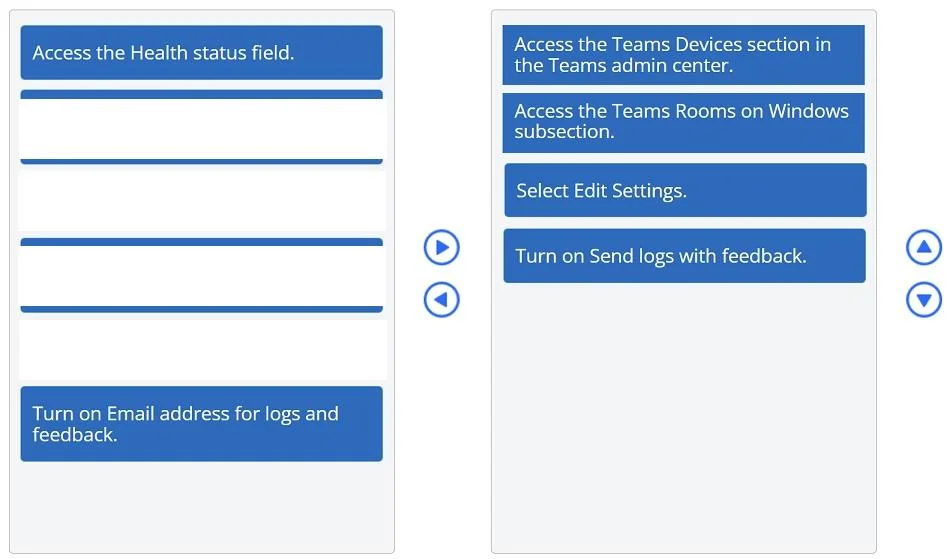
Answer Area
Drag items
Correct arrangement
- Access the Teams Devices section in the Teams admin center.
- Access the Teams Rooms on Windows subsection.
- Select Edit Settings.
- Turn on Send logs with feedback.
Explanation
Teams Rooms Diagnostic Logging - Exam Explanation
The Scenario
The manager wants to investigate voice lag and missing video on a Teams Rooms on Windows device. The fix is enabling diagnostic log collection for that device via the Teams admin center.
Why These Four Steps, In This Order
1. Access the Teams Devices section in the Teams admin center
Why first: This is the mandatory entry point. The Teams admin center (
admin.teams.microsoft.com) organizes device management under Devices in the left-hand navigation. You cannot reach any device-specific setting without entering this section first. There is no shortcut path.
2. Access the Teams Rooms on Windows subsection
Why second: The Devices section is subdivided by device type - Teams Rooms on Windows, Teams Rooms on Android, Phones, Panels, etc. You must drill into the correct subsection to see the specific device experiencing the issue. Skipping this means you're looking at the wrong device category entirely.
3. Select Edit Settings
Why third: Once you locate the specific Teams Rooms on Windows device, you must open its configuration via Edit Settings. Diagnostic/logging toggles live inside the device's settings panel - they are not visible from the device list view. You must be inside the device's settings before you can change anything.
4. Turn on Send logs with feedback
Why fourth: This toggle enables the device to transmit diagnostic logs (including meeting quality data like audio/video telemetry) to Microsoft. This is what allows the manager to access diagnostic data about the problematic meetings. It is the actual solution to the request.
Why the Other Items Are Wrong
| Item | Why Excluded |
|---|---|
| Access the Health status field | Shows current device health at a glance but does not enable log collection or provide meeting-level diagnostic data. It's a monitoring view, not a configuration action. |
| Turn on Email address for logs and feedback | This is a secondary optional field to route logs to a specific email - it is not required to enable log sending. The question asks about fulfilling the diagnostic data request, which requires enabling the logs themselves, not configuring their destination. |
Common Mistakes
- Choosing "Health status" over "Edit Settings" - Candidates confuse passive monitoring (Health status) with active diagnostic configuration. Health status won't help you investigate a past meeting's voice/video issue.
- Including the email address toggle - It looks relevant because it mentions "logs and feedback," but enabling log sending (
Send logs with feedback) is the functional requirement. The email field is optional configuration that comes after, and the question only asks for four steps. - Swapping steps 2 and 3 - You must be in the correct subsection before selecting a device to edit. Navigation always precedes configuration.
Topics
Community Discussion
No community discussion yet for this question.