nerdexam
Microsoft

MS-700 · Question #30

Litware, Inc. is an international manufacturing company that has 4,000 users. The company has the following four departments: IT, HR, R&D, Sales. Physical locations: Litware has two main offices…

The correct answer is A. From the Azure Active Directory admin center, modify the External collaboration settings to include fabrikam.com only. To restrict external collaboration to a specific domain (fabrikam.com) at an organizational level for all Microsoft 365 services, you should configure Azure AD external collaboration settings.

Configure and manage a Teams environment

Question

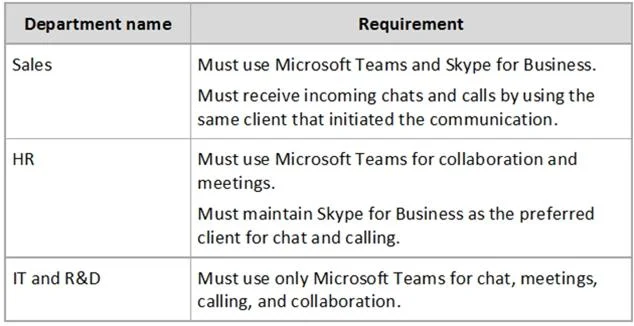
Litware, Inc. is an international manufacturing company that has 4,000 users. The company has the following four departments: IT, HR, R&D, Sales. Physical locations: Litware has two main offices. The offices are located in New York and London. All offices connect to each other by using a WAN link. Each office connects directly to the Internet. Existing environment: All user accounts have an Azure Active Directory Premium Plan P1 license. Litware has a Microsoft 365 subscription that has Office 365 Enterprise E3 licenses for all users. All the E3 products and services are enabled for each user. Litware uses Microsoft Skype for Business Online. Planned Upgrade: Litware decides the following requirements for a planned upgrade from Skype for Business Online to Microsoft Teams: - Provide high quality audio, video, and online meeting experience for Microsoft Teams end users. - Implement a data retention solution in Microsoft Teams. - Minimize costs and administrative effort. - Use the principle of least privilege. For the sales department, Litware plans to create a team that dynamically updates its membership when users leave and join the department. Department Upgrade Requirements: Litware plans to implement upgrade requirements for the departments as shown in the following table. [Image of Department name / Requirement table]. Microsoft Teams Requirements: All teams must meet the following requirements: - Only users in a partner company that uses a domain named fabrikam.com must be able to collaborate in teams by using guest accounts. - Only users in the compliance department of Litware must be able to create teams. Planned Network Tasks: Litware identifies the following network validation tasks: - An administrator named Admin5 must be able to review the required bandwidth to support audio conferencing, video conferencing, and screen sharing in Microsoft Teams. - An administrator named Admin6 must be able to review network issues that cause poor call quality reported by users. Data Retention Requirements: Litware identifies the following data retention requirements: - Requirement1: All messages in team collaborations must be deleted after seven years. - Requirement2: All files used in team collaborations must be retained for five years. - Requirement3: All files used in personal chats must be retained for five years. Device Requirements: You provide Microsoft Teams-certified IP phones to users in the IT and R&D departments. Each device must meet the following requirements: - The time zone on the phones used by the R&D department must be set to UTC-8. - The time zone on the phones used by the IT department must be set to UTC-5. - All phones must lock automatically after 60 seconds of inactivity. Voice Pilot Requirements: Litware wants to pilot Phone System as a calling solution for 20 IT department users. The pilot project will receive phone numbers from Microsoft Teams. Collaboration and Meeting Requirements: Litware identifies the following collaboration and meeting requirements: - Cloud recording must be disabled for all Microsoft Teams meetings organized by users in the HR departments only. - Meeting email invitations must be customized to include the Logo URL, Legal URL, and Help URL of Litware. What should you recommend to meet the Microsoft Teams requirements for guest access?

Exhibit

MS-700 question #30 exhibit

Options

  • AFrom the Azure Active Directory admin center, modify the External collaboration settings to include fabrikam.com only.
  • BFrom the Microsoft 365 admin center, modify the Office 365 groups settings.
  • CFrom the external access settings in the Microsoft Teams admin center, add fabrikam.com to the allowed list of domains.
  • DFrom the Microsoft Teams admin center, turn off org-wide guest access and manually add guest users from fabrikam.com to teams.

How the community answered

(23 responses)
  • A
    74% (17)
  • B
    9% (2)
  • C
    4% (1)
  • D
    13% (3)

Why each option

To restrict external collaboration to a specific domain (fabrikam.com) at an organizational level for all Microsoft 365 services, you should configure Azure AD external collaboration settings.

AFrom the Azure Active Directory admin center, modify the External collaboration settings to include fabrikam.com only.Correct

Azure AD external collaboration settings control guest access and collaboration with external domains for the entire Microsoft 365 tenant, including Teams, SharePoint, and other services. By configuring these settings to allow only fabrikam.com, you enforce the requirement at the foundational identity layer, ensuring consistency across all collaboration tools.

BFrom the Microsoft 365 admin center, modify the Office 365 groups settings.

Modifying Office 365 Groups settings in the Microsoft 365 admin center might have some external sharing controls, but Azure AD external collaboration settings provide a more comprehensive and tenant-wide control for domain restriction.

CFrom the external access settings in the Microsoft Teams admin center, add fabrikam.com to the allowed list of domains.

External access settings in the Microsoft Teams admin center primarily control federated communication (one-to-one chat and calling) with other organizations and guest access specifically for Teams, but Azure AD settings are more encompassing for overall tenant collaboration and guest user creation.

DFrom the Microsoft Teams admin center, turn off org-wide guest access and manually add guest users from fabrikam.com to teams.

Turning off org-wide guest access and manually adding users is inefficient and doesn't explicitly restrict to only fabrikam.com at a policy level for new guest additions. This is a manual operational task, not a policy enforcement.

Concept tested: Azure AD B2B collaboration settings for external domain restriction

Source: https://learn.microsoft.com/en-us/azure/active-directory/external-identities/external-collaboration-settings-overview

Topics

#Guest Access#External Collaboration#Azure Active Directory

Community Discussion

No community discussion yet for this question.

Full MS-700 Practice