
MS-700 · Question #168
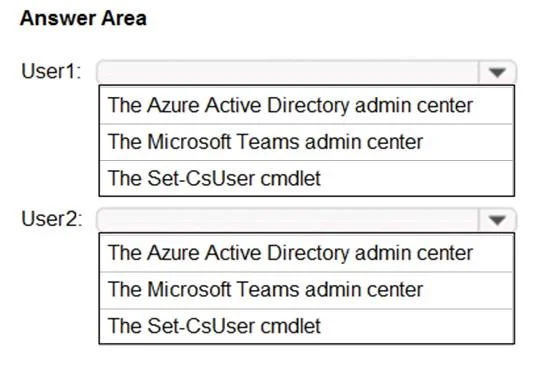
You need to ensure that the Approvals app is pinned to the top of the app bar of the Teams client for all members of the Retail team. The solution must NOT affect other users. To complete this task…
To pin a Microsoft Teams app for specific users without affecting others, an administrator must use the Microsoft Teams admin center to create and assign an app setup policy.
Question
Exhibit
Explanation
To pin a Microsoft Teams app for specific users without affecting others, an administrator must use the Microsoft Teams admin center to create and assign an app setup policy.
Approach. The correct interaction is to select 'The Microsoft Teams admin center' for both User1 and User2. The scenario requires ensuring the 'Approvals app' is pinned to the app bar for all members of the 'Retail team' and that the solution does NOT affect other users. Managing app pinning for Microsoft Teams users is done through app setup policies. These policies are created and managed within the Microsoft Teams admin center. An administrator would navigate to 'Teams apps' -> 'Setup policies', create a new custom policy, add the 'Approvals' app to the 'Pinned apps' list, and then assign this custom policy to the Azure AD security group or Microsoft 365 group representing the 'Retail team'. This ensures that only members of the Retail team receive the pinned app, satisfying all requirements of the question.
Common mistakes.
- common_mistake. Selecting 'The Azure Active Directory admin center' is incorrect because while Azure AD manages users and groups that Teams relies on, it does not manage application-specific configurations like app pinning within Teams itself. App setup policies are a Teams-specific configuration. Choosing 'The Set-CsUser cmdlet' is incorrect because this cmdlet is primarily used for managing Skype for Business Online user properties and is not the correct tool or cmdlet for configuring Microsoft Teams app setup policies. Teams app policies are managed using specific Teams PowerShell cmdlets (e.g.,
Grant-CsTeamsAppSetupPolicy) or, more commonly and visually, through the Microsoft Teams admin center. The question asks to identify an 'admin center' or tool, and 'Set-CsUser cmdlet' is a specific PowerShell command, not an administrative portal.
Concept tested. Microsoft Teams app management, app setup policies, administrative portals in Microsoft 365, and targeted policy assignment using groups.
Reference. null
Topics
Community Discussion
No community discussion yet for this question.