
MS-102 · Question #68
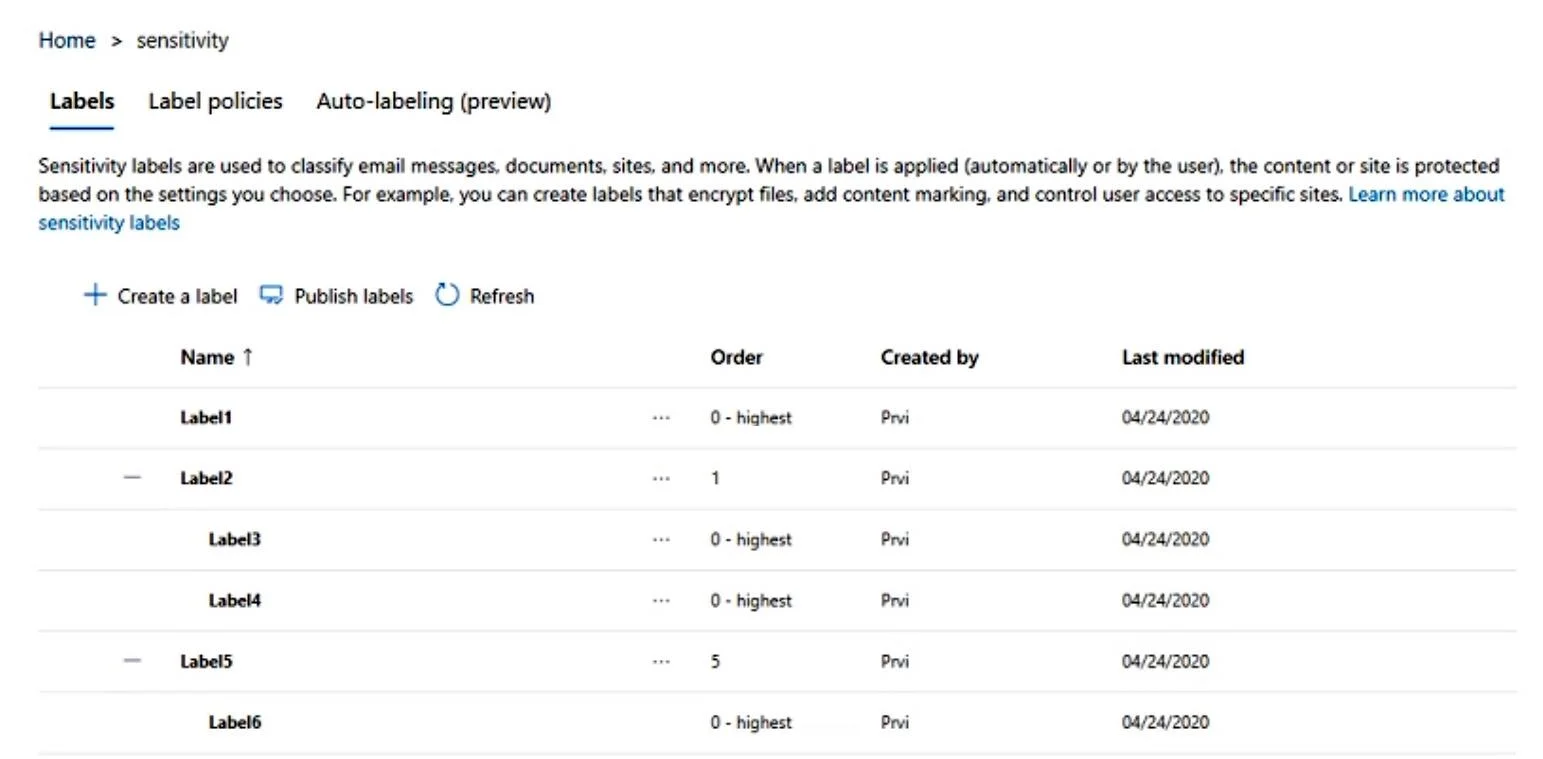
You have a Microsoft 365 E5 subscription that has published sensitivity labels shown in the following exhibit. Which labels can users apply to content?
The correct answer is C. Label1, Label3, Label4, and Label6 only. In Microsoft Purview, a sensitivity label that is configured as a parent label (i.e., it has sublabels nested beneath it) cannot be applied directly to content by users - only its child (sublabel) entries can be applied. Based on the exhibit, Label2 and Label5 are…
Question
You have a Microsoft 365 E5 subscription that has published sensitivity labels shown in the following exhibit. Which labels can users apply to content?
Exhibit
Options
- ALabel1, Label2, and Label5 only
- BLabel3, Label4, and Label6 only
- CLabel1, Label3, Label4, and Label6 only
- DLabel1, Label2, Label3, Label4, Label5, and Label6
How the community answered
(52 responses)- A4% (2)
- B8% (4)
- C71% (37)
- D17% (9)
Explanation
In Microsoft Purview, a sensitivity label that is configured as a parent label (i.e., it has sublabels nested beneath it) cannot be applied directly to content by users - only its child (sublabel) entries can be applied. Based on the exhibit, Label2 and Label5 are parent/container labels that each have sublabels beneath them (Label3 and Label4 under Label2; Label6 under Label5). Label1 is a standalone label with no sublabels. Users can therefore apply Label1 (standalone), Label3, Label4 (sublabels of Label2), and Label6 (sublabel of Label5), but cannot apply Label2 or Label5 directly because they are parent labels. This matches answer C.
Topics
Community Discussion
No community discussion yet for this question.