
MS-102 · Question #511
You configure a conditional access policy. The locations settings are configured as shown in the Locations exhibit. (Click the Locations tab.) The users and groups settings are configured as shown…
The correct answer is D. From the Azure Active Directory admin center, create a named location. Based on the described exhibits, the conditional access policy is blocking sign-in from certain locations, and the Security reader group is included in the policy scope. The users are in the office and cannot sign in, which means the office network is being treated as a blocked…
Question
You configure a conditional access policy. The locations settings are configured as shown in the Locations exhibit. (Click the Locations tab.) The users and groups settings are configured as shown in the Users and Groups exhibit. (Click Users and Groups tab.) Members of the Security reader group report that they cannot sign in to Microsoft Active Directory (Azure AD) on their device while they are in the office. You need to ensure that the members of the Security reader group can sign in in to Azure AD on their device while they are in the office. The solution must use the principle of least privilege. What should you do?
Exhibits
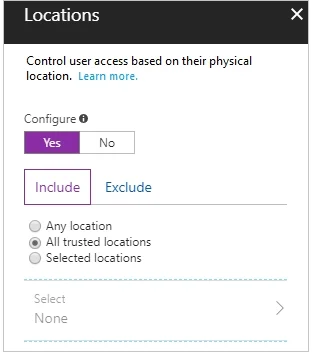
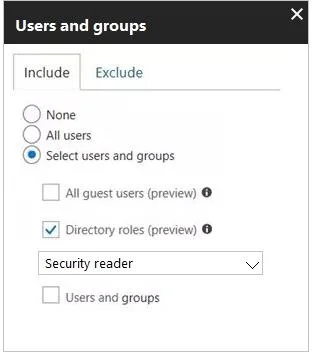
Options
- AFrom the conditional access policy, configure the device state.
- BFrom the Azure Active Directory admin center, create a custom control.
- CFrom the Intune admin center, create a device compliance policy.
- DFrom the Azure Active Directory admin center, create a named location.
How the community answered
(38 responses)- A18% (7)
- B26% (10)
- C5% (2)
- D50% (19)
Explanation
Based on the described exhibits, the conditional access policy is blocking sign-in from certain locations, and the Security reader group is included in the policy scope. The users are in the office and cannot sign in, which means the office network is being treated as a blocked or untrusted location. The least-privilege solution is to create a named location in Azure AD that represents the office IP range/network, then configure the conditional access policy to exclude that named location from enforcement. This allows office-based sign-ins without broadly changing the policy or granting additional roles. Configuring device state (A) addresses device compliance, not location. Creating a custom control (B) is for third-party MFA integrations. Creating a device compliance policy (C) in Intune addresses compliance posture, not location-based conditional access blocking.
Topics
Community Discussion
No community discussion yet for this question.