
MS-102 · Question #49
You have a Microsoft 365 subscription that contains the domains shown in the following exhibit. Which domain name suffixes can you use when you create users?
The correct answer is D. all the domains in the subscription. When creating users in Microsoft 365, all domains that are properly added and available in the subscription, including the initial .onmicrosoft.com domain, its subdomains, and any verified custom domains, can typically be used as User Principal Name (UPN) suffixes.
Question
You have a Microsoft 365 subscription that contains the domains shown in the following exhibit. Which domain name suffixes can you use when you create users?
Exhibit
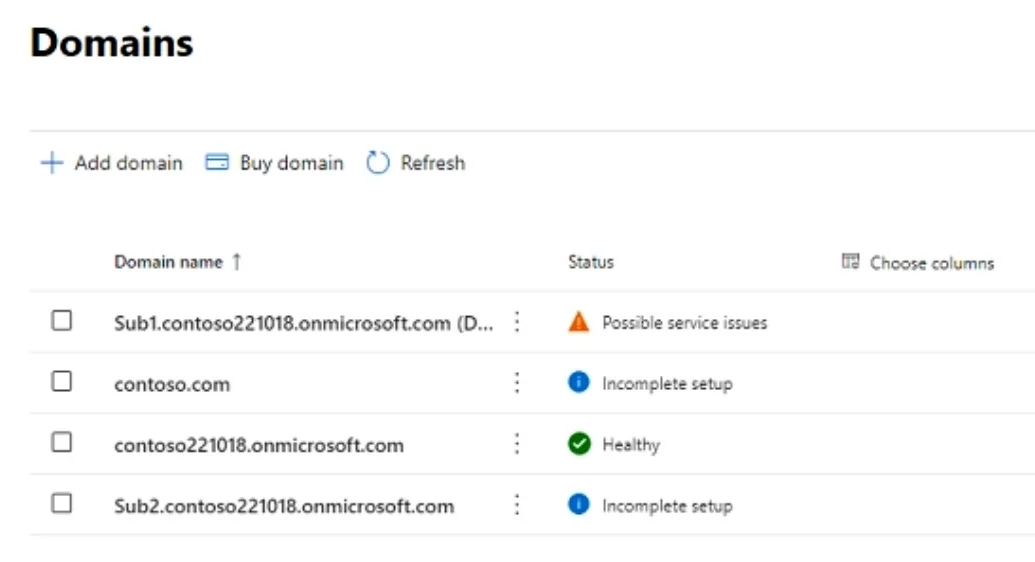
Options
- Aonly Sub1.contoso221018.onmicrosoft.com
- Bonly contoso221018.onmicrosoft.com and Sub2.contoso221018.onmicrosoft.com
- Conly contoso221018.onmicrosoft.com, Sub.contoso221018.onmicrosoft.com, and
- Dall the domains in the subscription
How the community answered
(54 responses)- A6% (3)
- B2% (1)
- C2% (1)
- D91% (49)
Why each option
When creating users in Microsoft 365, all domains that are properly added and available in the subscription, including the initial .onmicrosoft.com domain, its subdomains, and any verified custom domains, can typically be used as User Principal Name (UPN) suffixes.
Limiting to only one specific subdomain is incorrect because the initial .onmicrosoft.com domain, other verified custom domains, and other available .onmicrosoft.com subdomains are also usable.
This option incorrectly excludes a verified custom domain and other potential .onmicrosoft.com subdomains that could be used for user creation.
This option excludes valid .onmicrosoft.com subdomains or custom domains that can be used for user creation.
All domains added to a Microsoft 365 subscription, once properly configured and available, can be used as domain name suffixes when creating new user accounts, including the initial .onmicrosoft.com domain, custom domains, and their related subdomains.
Concept tested: Microsoft 365 user creation and UPN domains
Source: https://learn.microsoft.com/en-us/microsoft-365/admin/setup/add-domain?view=o365-worldwide
Topics
Community Discussion
No community discussion yet for this question.