
MS-102 · Question #427
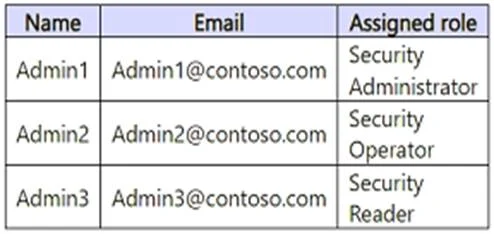
You have a Microsoft 365 E5 subscription. You create the users shown in the following table. You plan to use Microsoft Entra ID Protection. Which users will be added automatically to the Users at…
The correct answer is D. Admin1 and Admin3 only. Microsoft Entra ID Protection sends two types of automated notification emails to help you manage user risk and risk detections: Users at risk detected email Weekly digest email By default, users actively assigned Global Administrator, Security Administrator, or Security Reader…
Question
You have a Microsoft 365 E5 subscription. You create the users shown in the following table. You plan to use Microsoft Entra ID Protection. Which users will be added automatically to the Users at risk detected alerts list?
Exhibit
Options
- AAdmin1 only
- BAdmin2 only
- CAdmin1 and Admin2 only
- DAdmin1 and Admin3 only
- EAdmin1, Admin2, and Admin3
How the community answered
(39 responses)- A3% (1)
- B15% (6)
- C21% (8)
- D56% (22)
- E5% (2)
Explanation
Microsoft Entra ID Protection sends two types of automated notification emails to help you manage user risk and risk detections: Users at risk detected email Weekly digest email By default, users actively assigned Global Administrator, Security Administrator, or Security Reader roles are automatically added to this list if that user has a valid "Email" or "Alternate email" configured. If a user is enrolled in PIM to elevate to one of these roles on demand, then they will only receive emails if they are elevated at the time the email is sent. https://learn.microsoft.com/en-us/entra/id-protection/howto-identity-protection-configure-
Topics
Community Discussion
No community discussion yet for this question.