
MS-102 · Question #278
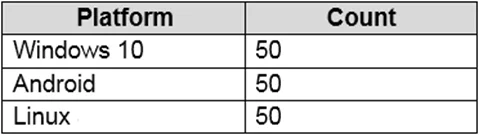
You have a Microsoft 365 E5 subscription that contains the devices shown in the following table. You need to configure an incident email notification rule that will be triggered when an alert occurs…
The correct answer is D. From the Azure Active Directory admin center, create a dynamic device group. https://learn.microsoft.com/en-us/mem/intune/enrollment/device-group-mapping "To enable automatic grouping, you must create a dynamic group using attribute-based rules in Azure AD. For instructions, see Using attributes to create advanced rules in the Azure AD documentation…
Question
You have a Microsoft 365 E5 subscription that contains the devices shown in the following table. You need to configure an incident email notification rule that will be triggered when an alert occurs only on a Windows 10 device. The solution must minimize administrative effort. What should you do first?
Exhibit
Options
- AFrom the Microsoft 365 admin center, create a mail-enabled security group.
- BFrom the Microsoft 365 Defender portal, create a device group.
- CFrom the Microsoft Endpoint Manager admin center, create a device category.
- DFrom the Azure Active Directory admin center, create a dynamic device group.
How the community answered
(37 responses)- A3% (1)
- B8% (3)
- C5% (2)
- D84% (31)
Explanation
https://learn.microsoft.com/en-us/mem/intune/enrollment/device-group-mapping "To enable automatic grouping, you must create a dynamic group using attribute-based rules in Azure AD. For instructions, see Using attributes to create advanced rules in the Azure AD documentation. Create an advanced rule for your group using the deviceCategory attribute and the category name you created in Step 1 of this article.
Topics
Community Discussion
No community discussion yet for this question.