
MD-102 · Question #264
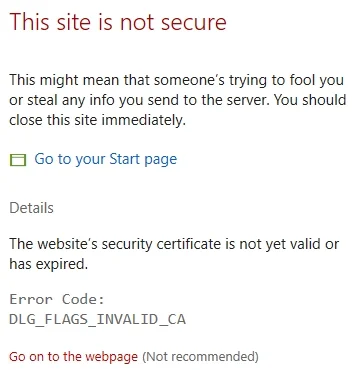
You use Windows Admin Center to remotely administer computers that run Windows 10. When connecting to Windows Admin Center, you receive the message shown in the following exhibit. You need to…
The correct answer is B. Trusted Root Certification Authorities. The certificate warning in Windows Admin Center appears because the browser or operating system does not trust the certificate presented by the WAC gateway. To eliminate this warning, the certificate (or its issuing CA certificate) must be imported into the Trusted Root…
Question
You use Windows Admin Center to remotely administer computers that run Windows 10. When connecting to Windows Admin Center, you receive the message shown in the following exhibit. You need to prevent the message from appearing when you connect to Windows Admin Center. To which certificate store should you import the certificate?
Exhibit
Options
- AClient Authentication Issuers
- BTrusted Root Certification Authorities
- CPersonal
How the community answered
(55 responses)- A5% (3)
- B84% (46)
- C11% (6)
Explanation
The certificate warning in Windows Admin Center appears because the browser or operating system does not trust the certificate presented by the WAC gateway. To eliminate this warning, the certificate (or its issuing CA certificate) must be imported into the Trusted Root Certification Authorities store on the client machine. This store tells Windows and browsers to inherently trust certificates signed by that authority. The Personal store (C) holds certificates with associated private keys for your own identity - importing a server cert there does not establish trust. Client Authentication Issuers (A) is used for client certificate authentication scenarios, not for trusting a server's TLS certificate.
Topics
Community Discussion
No community discussion yet for this question.