
MD-102 · Question #263
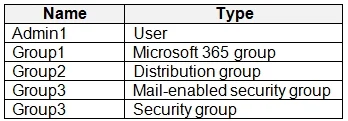
You have a Microsoft 365 tenant that contains the objects shown in the following table. In the Microsoft Endpoint Manager admin center, you are creating a Microsoft 365 Apps app named App1. To which…
The correct answer is D. Group1, Group3, and Group4 only. Microsoft 365 Apps (Office 365) deployed via Intune can only be assigned to Azure AD user groups or device groups that are Azure AD groups. Based on the referenced table, Group1, Group3, and Group4 are valid Azure AD groups eligible for app assignment. Admin1 is an individual…
Question
You have a Microsoft 365 tenant that contains the objects shown in the following table. In the Microsoft Endpoint Manager admin center, you are creating a Microsoft 365 Apps app named App1. To which objects can you assign App1?
Exhibit
Options
- AAdmin1, Group3, and Group4 only
- BGroup1, Group2, Group3, and Group4 only
- CAdmin1, Group1, Group2, Group3, and Group4
- DGroup1, Group3, and Group4 only
- EGroup3 and Group4 only
How the community answered
(41 responses)- A2% (1)
- B12% (5)
- C5% (2)
- D73% (30)
- E7% (3)
Explanation
Microsoft 365 Apps (Office 365) deployed via Intune can only be assigned to Azure AD user groups or device groups that are Azure AD groups. Based on the referenced table, Group1, Group3, and Group4 are valid Azure AD groups eligible for app assignment. Admin1 is an individual user account (not a group), and Intune app assignments target groups, not individual users directly. Group2 is likely an on-premises Active Directory security group or a distribution list that is not synced as an Azure AD group, making it ineligible as an assignment target in Intune.
Topics
Community Discussion
No community discussion yet for this question.