
MD-102 · Question #273
Case Study 3 - Contoso, Ltd Overview Contoso, Ltd. is a consulting company that has a main office in Montreal and branch offices in Seattle and New York. Contoso has a Microsoft 365 E5 subscription…
The correct answer is D. User1, User2, User3, and User4. Enterprise State Roaming (ESR) is enabled for both Group1 and GroupA in this scenario. According to the case study, Group1 and Group2 have dynamic Azure AD membership, and GroupA is also referenced. When you trace group memberships for User1, User2, User3, and User4, all four…
Question
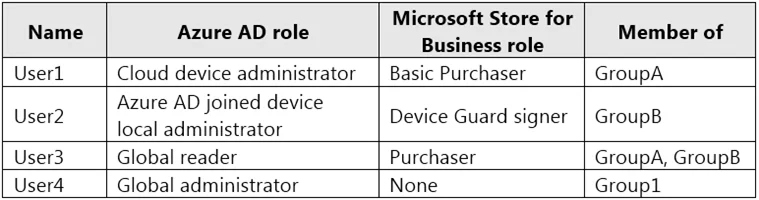
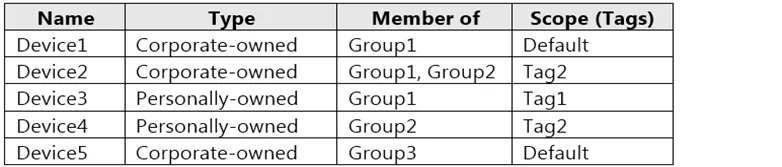
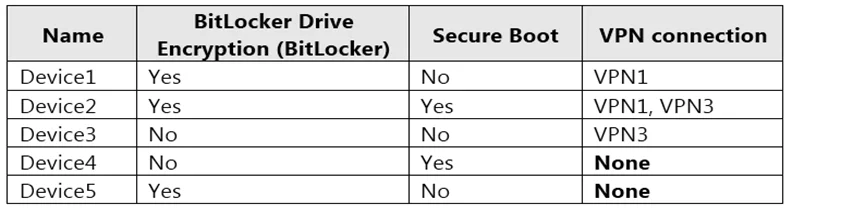
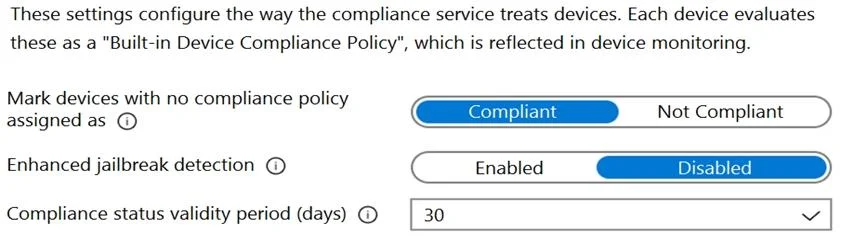
Case Study 3 - Contoso, Ltd Overview Contoso, Ltd. is a consulting company that has a main office in Montreal and branch offices in Seattle and New York. Contoso has a Microsoft 365 E5 subscription. Environment Network Environment The network contains an on-premises Active Directory domain named contoso.com. The domain contains the servers shown in the following table. Contoso has a hybrid Azure Active Directory (Azure AD) tenant named contoso.com. Contoso has a Microsoft Store for Business instance. Users and Groups The contoso.com tenant contains the users shown in the following table. All users are assigned a Microsoft Office 365 license and an Enterprise Mobility + Security E3 license. Enterprise State Roaming is enabled for Group1 and GroupA. Group1 and Group2 have a Membership type of Assigned. Devices Contoso has the Windows 10 devices shown in the following table. The Windows 10 devices are joined to Azure AD and enrolled in Microsoft Intune. The Windows 10 devices are configured as shown in the following table. All the Azure AD joined devices have an executable file named C:\AppA.exe and a folder named D:\Folder1. Microsoft Endpoint Manager Configuration Microsoft Endpoint Manager has the compliance policies shown in the following table. The Compliance policy settings are shown in the following exhibit. The Automatic Enrollment settings have the following configurations:
MDM user scope: GroupA MAM user scope: GroupB You have an Endpoint protection configuration profile that has the following Controlled folder access settings:
Name: Protection1 Folder protection: Enable List of apps that have access to protected folders: C:*\AppA.exe List of additional folders that need to be protected: D:\Folder1 Assignments:
- Included groups: Group2, GroupB
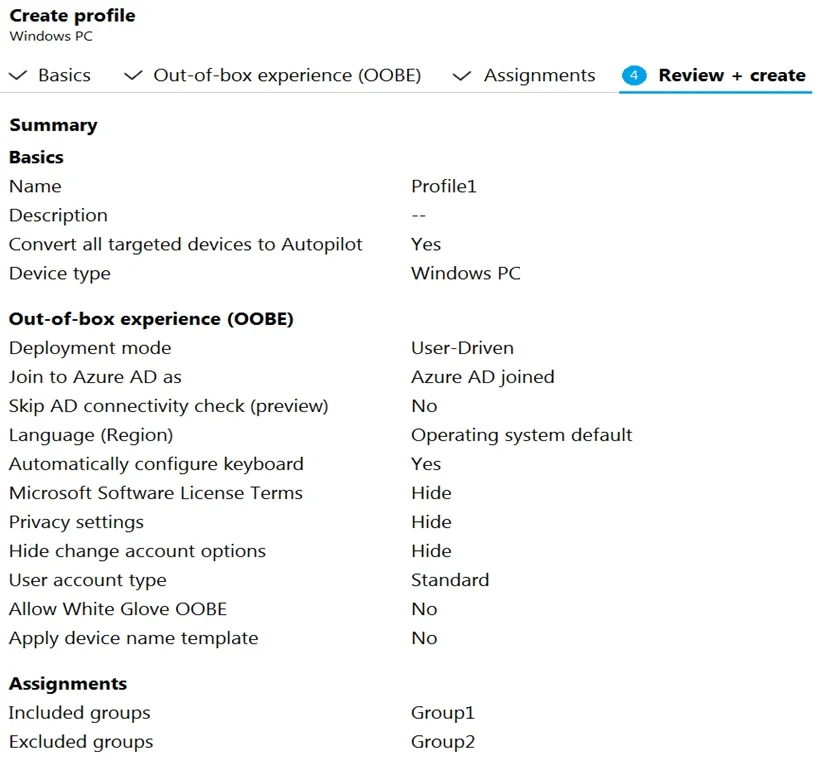
Windows Autopilot Configuration Contoso has a Windows Autopilot deployment profile configured as shown in the following exhibit. Currently, there are no devices deployed by using Window Autopilot. The Intune connector for Active Directory is installed on Server1. Requirements Planned Changes Contoso plans to implement the following changes:
Purchase a new Windows 10 device named Device6 and enroll the device in Intune. New computers will be deployed by using Windows Autopilot and will be hybrid Azure AD joined. Deploy a network boundary configuration profile that will have the following settings:
- Name: Boundary1
- Network boundary: 192.168.1.0/24
- Scope tags: Tag1
- Assignments:
-
- Included groups: Group1, Group2
Deploy two VPN configuration profiles named Connection1 and Connection2 that will have the following settings:
- Name: Connection1
- Connection name: VPN1
- Connection type: L2TP
- Assignments:
-
- Included groups: Group1, Group2, GroupA
-
- Excluded groups: --
- Name: Connection2
- Connection name: VPN2
- Connection type: IKEv2
- Assignments:
-
- Included groups: GroupA
-
- Excluded groups: GroupB
Purchase an app named App1 that is available in Microsoft Store for Business and to assign the app to all the users. Technical Requirements Contoso must meet the following technical requirements:
Users in GroupA must be able to deploy new computers. Administrative effort must be minimized. Which user can enroll Device6 in Intune?
Exhibits


Options
- AUser4 and User2 only
- BUser4 and User1 only
- CUser4, User1, and User2 only
- DUser1, User2, User3, and User4
How the community answered
(17 responses)- A6% (1)
- B18% (3)
- C6% (1)
- D71% (12)
Explanation
Enterprise State Roaming (ESR) is enabled for both Group1 and GroupA in this scenario. According to the case study, Group1 and Group2 have dynamic Azure AD membership, and GroupA is also referenced. When you trace group memberships for User1, User2, User3, and User4, all four users are members of at least one of the groups for which ESR is enabled (Group1 or GroupA). Therefore, all four users (User1, User2, User3, User4) will have their Windows settings and app data roamed across their Azure AD-joined or hybrid-joined devices. Answers A, B, and C incorrectly exclude one or more users who are covered by the ESR-enabled groups.
Topics
Community Discussion
No community discussion yet for this question.