
Microsoft
MB5-705 · Question #93
You need to create a project by using the Sure Step Project Creation Wizard. Which two properties must you identify in order to proceed? (Each correct answer presents part of the solution. Choose…
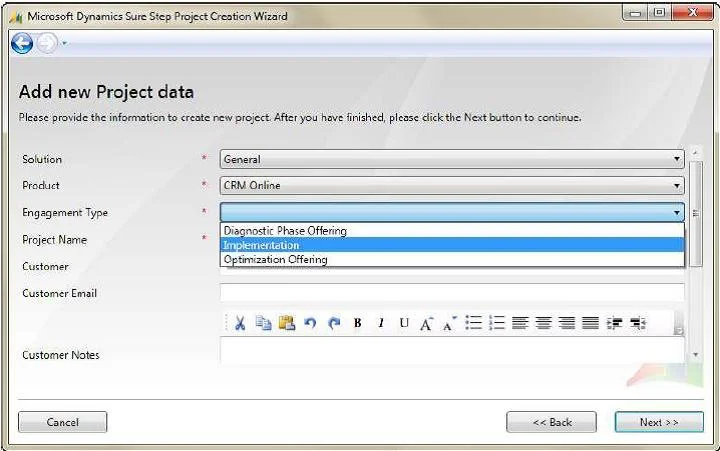
The correct answer is A. engagement type B. product. 1. In the Microsoft Dynamics Sure Step main window, click the Projects tab. 2. Click Project List, and then click Create New Project. 3. On the Sure Step Project Creation Wizard welcome page, click Next. 4. On the "Add new project data" window, choose a Solution, Product, and…
Initiate Microsoft Dynamics implementation projects
Question
You need to create a project by using the Sure Step Project Creation Wizard. Which two properties must you identify in order to proceed? (Each correct answer presents part of the solution. Choose two.)
Exhibit
Options
- Aengagement type
- Bproduct
- Cproject implementation phase
- Dproduct version
How the community answered
(36 responses)- A75% (27)
- C11% (4)
- D14% (5)
Explanation
- In the Microsoft Dynamics Sure Step main window, click the Projects tab. 2. Click Project List, and then click Create New Project. 3. On the Sure Step Project Creation Wizard welcome page, click Next. 4. On the "Add new project data" window, choose a Solution, Product, and Engagement Type. Type your project name and optionally fill in the rest of the fields. Click Next to
Topics
#Project Creation Wizard#engagement type#product selection#Sure Step setup
Community Discussion
No community discussion yet for this question.