
MB-500 · Question #75
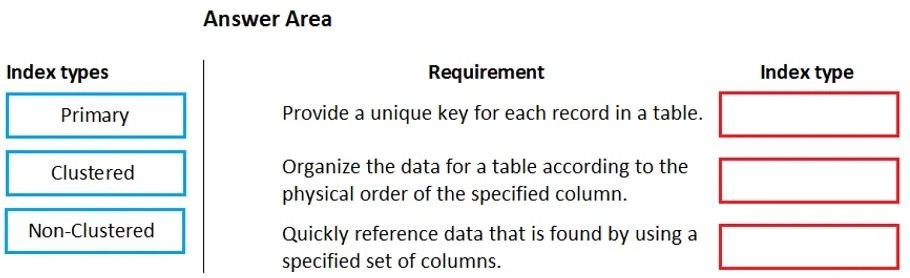
Drag and Drop Question A company has a Dynamics 365 Finance environment. You need to implement indices for new tables. Which types of indexes should you use? To answer, drag the appropriate types of…
The correct answer is Primary; Clustered; Non-Clustered. Dynamics 365 Finance - Index Types Explanation > Note: The question as presented is missing the actual requirement descriptions (what each numbered slot requires). The correct arrangement is given, so I'll explain each index type and the typical D365 Finance requirement that…
Question
Exhibit
Answer Area
Drag items
Correct arrangement
- Primary
- Clustered
- Non-Clustered
Explanation
Dynamics 365 Finance - Index Types Explanation
Note: The question as presented is missing the actual requirement descriptions (what each numbered slot requires). The correct arrangement is given, so I'll explain each index type and the typical D365 Finance requirement that maps to it.
Index Type Overview in D365 Finance Context
D365 Finance runs on SQL Server, and table indexes are defined in the AOT (Application Object Tree). Three index types exist with distinct roles:
Placement 1: Primary
Typical requirement: "Uniquely identify each record in the table."
In D365 Finance, a table's Primary Index property points to the index that serves as the logical key for the record. This is almost always tied to the RecId field or a surrogate key. It enforces uniqueness and is used by the framework for record lookup.
- It is set via the table's Primary Index property in the AOT
- Does not inherently control physical storage order
- Required for framework features like caching and record-level operations
Placement 2: Clustered
Typical requirement: "Control the physical storage order of table data / optimize range queries."
A Clustered Index determines how rows are physically sorted and stored in the database. SQL Server allows only one clustered index per table.
- Best for columns used in
ORDER BY,BETWEEN, or range filters - D365 lets you mark an index as clustered via the
Clusteredproperty on the index node - Common mistake: confusing clustered with primary - they are independent concepts. The primary index can be non-clustered.
Placement 3: Non-Clustered
Typical requirement: "Speed up queries on non-key or non-ordered fields without changing physical data layout."
A Non-Clustered Index creates a separate lookup structure pointing back to the actual data rows. You can have multiple non-clustered indexes per table.
- Ideal for columns frequently used in
WHEREclauses but not in range scans - Lower cost than clustered but adds overhead on inserts/updates
- Common mistake: over-indexing with non-clustered indexes, degrading write performance
Common Misconceptions
| Misconception | Reality |
|---|---|
| Primary index = clustered index | They are separate settings in D365; primary enforces uniqueness, clustered controls storage order |
| Only one index per table | Only one clustered index is allowed; multiple non-clustered are fine |
| Non-clustered is always inferior | For point lookups, non-clustered often outperforms clustered |
Summary: The arrangement follows the natural hierarchy - Primary for identity/uniqueness, Clustered for physical data organization, Non-Clustered for supplemental query optimization.
Topics
Community Discussion
No community discussion yet for this question.