
MB-500 · Question #327
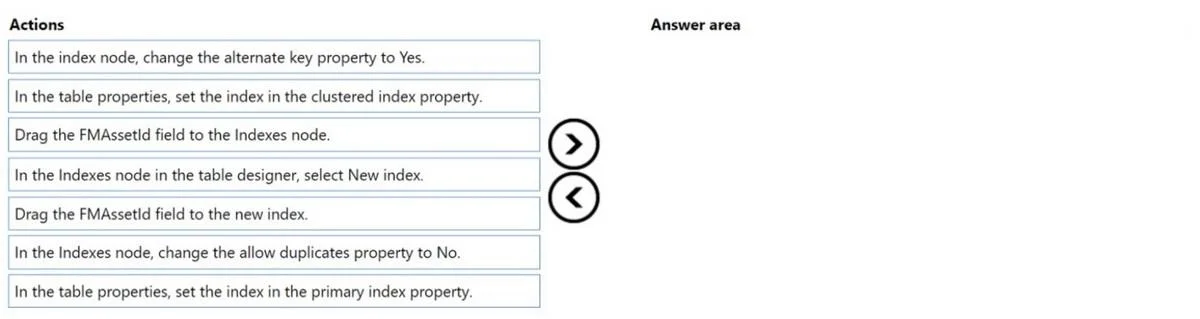
Drag and Drop Question You create a table in Dynamics 365 Finance. You must create a unique index from an existing field named FMAssetId. You need to set the index as the primary key of the table…
The correct answer is In the Indexes node in the table designer, select New Index.; Drag the FMAssetId field to the new index.; In the Indexes node, change the allow duplicates property to No.; In the table properties, set the index in the primary index property. Dynamics 365 Finance: Creating a Primary Key Index Overview You're working in the Visual Studio table designer (AOT - Application Object Tree) for D365 Finance. The goal is to create a unique index on FMAssetId and promote it to the table's primary key. These four steps must…
Question
Exhibit
Answer Area
Drag items
Correct arrangement
- In the Indexes node in the table designer, select New Index.
- Drag the FMAssetId field to the new index.
- In the Indexes node, change the allow duplicates property to No.
- In the table properties, set the index in the primary index property.
Explanation
Dynamics 365 Finance: Creating a Primary Key Index
Overview
You're working in the Visual Studio table designer (AOT - Application Object Tree) for D365 Finance. The goal is to create a unique index on FMAssetId and promote it to the table's primary key. These four steps must happen in a specific dependency order - each step builds on the previous one.
Step-by-Step Breakdown
Step 1: In the Indexes node in the table designer, select New Index.
You must create the index container before you can add fields to it. Nothing else is possible until the index node exists. This is the mandatory starting point - you can't drag a field to an index that doesn't exist yet.
Step 2: Drag the FMAssetId field to the new index.
Once the index node exists, you populate it with the field that defines the index. The index has no meaning without at least one field. This must come before setting properties, because the properties you're about to set apply to the populated index.
Step 3: In the Indexes node, change the allow duplicates property to No.
Setting Allow Duplicates = No makes the index unique - a requirement for any primary key. A primary key must guarantee row uniqueness, so this property must be set before designating it as the primary key. If duplicates were allowed, D365 would not permit you to use it as a primary key.
Step 4: In the table properties, set the index in the primary index property.
Only after the index exists, has a field, and is unique can you navigate to the table-level properties and assign this index as the Primary Index. This is a table-wide setting that points to an already-configured index.
Why the Distractors Are Wrong
| Distractor | Why it's excluded |
|---|---|
| Drag the FMAssetId field to the Indexes node | You drag to the specific new index, not the parent Indexes node directly. |
| Change the alternate key property to Yes | Alternate key is for surrogate/natural key scenarios, not for designating a primary key. |
| Set the index in the clustered index property | Clustered index controls physical storage order - it's separate from the primary key concept in AOT. The question asks for primary key, not clustered index. |
Common Mistakes
- Skipping "Allow Duplicates = No" - Candidates often jump straight from adding the field to setting the primary index property. D365 won't allow a non-unique index to be the primary key.
- Confusing clustered index with primary index - These are distinct table properties. The primary index enforces uniqueness/identity; the clustered index controls the B-tree physical sort. They're often the same index, but the question specifically asks about the primary key designation.
- Confusing alternate key with primary key - Alternate key = Yes marks a unique index as a candidate/natural key for external references, not the primary key.
Topics
Community Discussion
No community discussion yet for this question.