
MB-500 · Question #289
Drag and Drop Question A company has a table named CustTrans that includes a column named AmountCur. You are creating a Power BI analytical report that uses the AmountCur information. The report…
The correct answer is Create a view named MyCustTransView.; Set the value of the Date, by dimension relation constraint for the Related Field property to TransDate.; Add a measure named AmountCurSum. Change the value of the column property to AmountCur. Change the value for the Default Aggregate property to Sum.; Create an aggregate measurement named MyCustTransAgg. Change the value of the measure group Table property to MyCustTransView. Explanation: Building an Aggregate Measurement in Dynamics 365 / Power BI This question is set in Microsoft Dynamics 365 Finance & Operations, where aggregate measurements are defined in the Application Object Tree (AOT) and published to the Entity Store for Power BI reporting…
Question
Exhibit
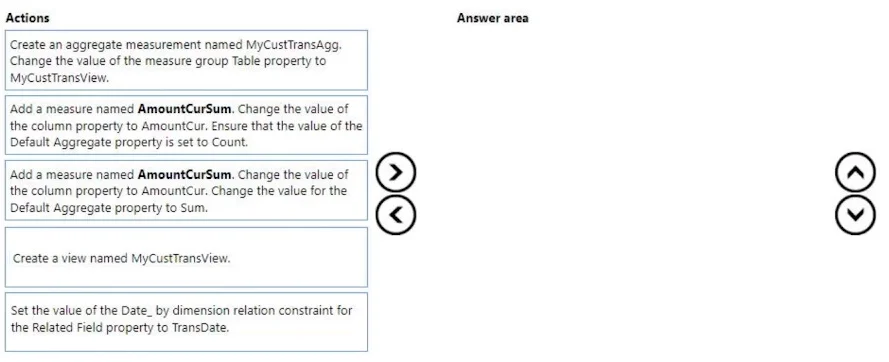
Answer Area
Drag items
Correct arrangement
- Create a view named MyCustTransView.
- Set the value of the Date, by dimension relation constraint for the Related Field property to TransDate.
- Add a measure named AmountCurSum. Change the value of the column property to AmountCur. Change the value for the Default Aggregate property to Sum.
- Create an aggregate measurement named MyCustTransAgg. Change the value of the measure group Table property to MyCustTransView.
Explanation
Explanation: Building an Aggregate Measurement in Dynamics 365 / Power BI
This question is set in Microsoft Dynamics 365 Finance & Operations, where aggregate measurements are defined in the Application Object Tree (AOT) and published to the Entity Store for Power BI reporting.
Why This Specific Order
The sequence follows a logical dependency chain - each step creates the foundation the next step requires.
Step-by-Step Breakdown
Step 1 - Create a view named MyCustTransView
The view is the data source foundation. Aggregate measurements in D365 F&O are built on top of views (or tables), not directly on raw tables. You must define what data is exposed before you can configure anything else. Without this view, there is nothing to point your aggregate measurement at.
Step 2 - Set the Related Field property to TransDate (Date dimension constraint)
This step wires up the time intelligence relationship. The "Date, by" dimension constraint tells the framework which field on your view maps to the Date dimension - in this case, TransDate. This is what enables the report requirement of "any time during the previous week" (i.e., filtering by date ranges). It must come before you define measures, because the dimensional model needs to be established first.
Step 3 - Add measure AmountCurSum, column = AmountCur, Default Aggregate = Sum
Now that the view and date relationship exist, you add the measure that actually computes the value. The requirement says "total transaction amounts" - that means Sum, not Count. This is the most common mistake on this question: Count would give you the number of transactions, not the monetary total.
Step 4 - Create aggregate measurement MyCustTransAgg, measure group Table = MyCustTransView
Finally, you create the aggregate measurement object itself and point its measure group table to the view created in Step 1. This ties the whole structure together and registers it as a publishable aggregate measurement for the Entity Store / Power BI.
Common Mistakes & Misconceptions
| Mistake | Why It's Wrong |
|---|---|
| Choosing Count instead of Sum | The requirement asks for total amounts (monetary sum), not number of records |
| Creating the aggregate measurement before the view | The measure group Table property has nothing to reference yet |
Skipping the TransDate date relation | Without it, the report cannot filter by time period ("previous week") |
| Adding the measure before configuring the date dimension | The dimensional context should be established before populating measures |
The core mental model: View first (data source) → Date relationship (time intelligence) → Measure (what to compute) → Aggregate measurement object (container that publishes it all).
Topics
Community Discussion
No community discussion yet for this question.