
MB-500 · Question #286
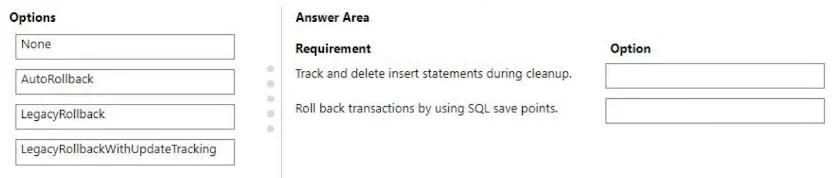
Drag and Drop Question A company uses Dynamics 365 finance and operation apps. The company must create test cases by using the SysTest framework. The test cases must meet the following requirements…
The correct answer is LegacyRollback; Autorollback. SysTest Framework: TestTransactionMode Options Overview The TestTransactionMode enum in Dynamics 365 F&O's SysTest framework controls how test data is cleaned up after each test runs. Choosing the wrong mode leads to data leaking between tests. --- Requirement 1: All insert…
Question
Exhibit
Answer Area
Drag items
Correct arrangement
- LegacyRollback
- Autorollback
Explanation
SysTest Framework: TestTransactionMode Options
Overview
The TestTransactionMode enum in Dynamics 365 F&O's SysTest framework controls how test data is cleaned up after each test runs. Choosing the wrong mode leads to data leaking between tests.
Requirement 1: All insert statements must be tracked and deleted during cleanup
Answer: LegacyRollback
Why: LegacyRollback works by recording every INSERT statement made during the test. On cleanup, it explicitly deletes those records. It does NOT use SQL savepoints - it maintains an internal list of inserted rows and removes them one by one. This is the legacy approach (pre-savepoint era).
Requirement 2: Transactions must be rolled back using SQL save points
Answer: Autorollback
Why: Autorollback uses SQL Server's native SAVE TRANSACTION / ROLLBACK TRANSACTION TO SAVEPOINT mechanism. A savepoint is created before the test body runs, and after the test completes, all changes (inserts, updates, deletes) are rolled back to that savepoint atomically. This is the modern, preferred approach.
Why the Other Options Are Wrong
| Option | Why Not Used Here |
|---|---|
None | No cleanup at all - data persists after the test |
LegacyRollbackWithUpdateTracking | Tracks both inserts and updates - more than requirement 1 asks for, and still no savepoints |
Common Misconceptions
- Confusing
LegacyRollbackwithAutorollback: Both isolate test data, but through fundamentally different mechanisms - row deletion vs. SQL savepoint. - Choosing
LegacyRollbackWithUpdateTrackingfor requirement 1: It over-delivers (tracks updates too) and still doesn't match the savepoint requirement. - Assuming
Autorollbackonly handles inserts: It rolls back all DML (inserts, updates, deletes) via the savepoint, making it more complete than the legacy options.
Topics
Community Discussion
No community discussion yet for this question.