
MB-500 · Question #247
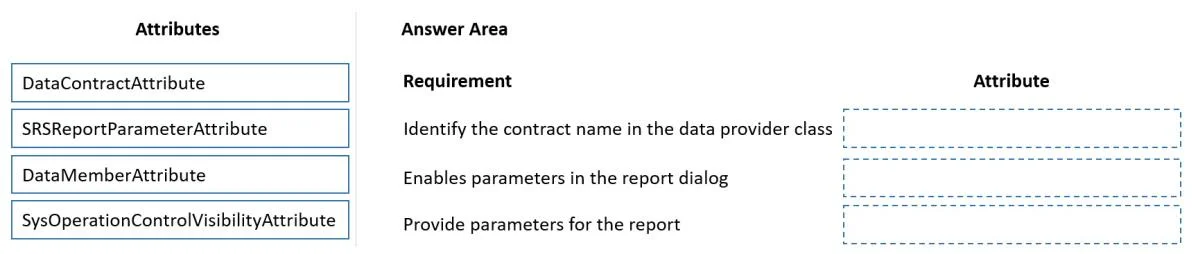
Drag and Drop Question A company implements Dynamics 365 Supply Chain Management. You need to create a report that shows all customer project invoices. Which attribute should you use? To answer…
The correct answer is SRSReportParameterAttribute; DataMemberAttribute; DataContractAttribute. D365 SCM SRS Report Attributes Explained Context When building an SSRS (SQL Server Reporting Services) report in D365 SCM using X++, you construct a data contract class to hold report parameters. Three attributes wire this infrastructure together. The requirements in the…
Question
Exhibit
Answer Area
Drag items
Correct arrangement
- SRSReportParameterAttribute
- DataMemberAttribute
- DataContractAttribute
Explanation
D365 SCM SRS Report Attributes Explained
Context
When building an SSRS (SQL Server Reporting Services) report in D365 SCM using X++, you construct a data contract class to hold report parameters. Three attributes wire this infrastructure together. The requirements in the question map to the three layers of that structure.
Attribute Placements
Requirement 1 → SRSReportParameterAttribute
Applied to the data contract class to bind it to a specific report. It tells the SRS framework "this contract class belongs to this report." Without it, the runtime cannot associate the parameter class with the correct report definition.
[DataContractAttribute, SRSReportParameterAttribute(classStr(SrsReportRunController))]
class CustProjInvoiceContract { ... }
Requirement 2 → DataMemberAttribute
Applied to individual parm methods inside the data contract class. Each parameter the user can filter on (e.g., date range, customer account) must be decorated with this attribute so the serialization framework exposes it to the report dialog and the SRS parameter mapping.
[DataMemberAttribute('FromDate')]
public TransDate parmFromDate(...) { ... }
Requirement 3 → DataContractAttribute
Applied to the class declaration itself. Marks the class as an X++ data contract - enabling serialization and making it recognizable to both the SRS parameter infrastructure and the SysOperation framework.
Why SysOperationControlVisibilityAttribute Is Not Used
This attribute controls UI control visibility in SysOperation dialogs (hiding/showing fields at runtime). It has no role in defining or binding SRS report parameters, making it a deliberate distractor.
Common Mistakes
| Mistake | Reality |
|---|---|
Putting DataContractAttribute alone and expecting parameters to appear | You must also decorate each parm method with DataMemberAttribute |
Confusing SRSReportParameterAttribute with the parameter definition | It links the contract to a report; DataMemberAttribute defines individual parameters |
Using SysOperationControlVisibilityAttribute on SRS reports | It applies to SysOperation batch dialogs, not SRS report dialogs |
Mental Model
Think of it as three concentric layers:
DataContractAttribute→ the class is a contractDataMemberAttribute→ these methods are parametersSRSReportParameterAttribute→ this contract belongs to that report
Topics
Community Discussion
No community discussion yet for this question.