
MB-500 · Question #191
Drag and Drop Question A company uses Dynamics 365 Finance. You create the following tables: You need to configure the system to meet the requirements. Which delete actions should you use? To…
The correct answer is Cascade; Restricted; Cascade+Restricted. Dynamics 365 Finance: Table Delete Actions Explained This question tests your knowledge of delete action types used in table relationships (defined via X++ or the AOT). Delete actions control what happens to child records when a parent record is deleted. --- The Three Delete…
Question
Exhibits

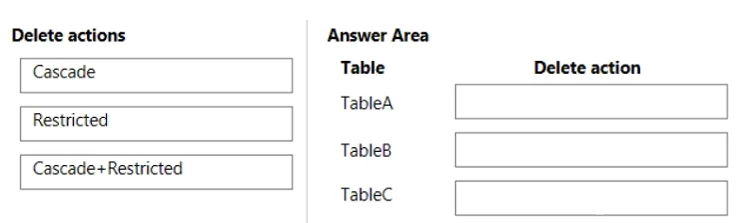
Answer Area
Drag items
Correct arrangement
- Cascade
- Restricted
- Cascade+Restricted
Explanation
Dynamics 365 Finance: Table Delete Actions Explained
This question tests your knowledge of delete action types used in table relationships (defined via X++ or the AOT). Delete actions control what happens to child records when a parent record is deleted.
The Three Delete Action Types
| Type | Behavior |
|---|---|
| Cascade | Automatically deletes all related child records when the parent is deleted |
| Restricted | Prevents deletion of the parent if any child records exist |
| Cascade+Restricted | Blocks direct deletion if children exist, but allows cascade deletion triggered from a grandparent |
Why Each Placement is Correct
Position 1 → Cascade Used when child records have no independent meaning without the parent. Classic example: Sales Order Lines must be deleted when the Sales Order Header is deleted. The child records are owned by the parent, so cascading is safe and expected.
Position 2 → Restricted Used when deleting the parent would create a data integrity problem. Classic example: You cannot delete a Customer record if open invoices or transactions exist. The system blocks the delete and forces the user to clean up children first.
Position 3 → Cascade+Restricted Used for intermediate (middle-tier) tables in a 3-level hierarchy (e.g., A → B → C). The behavior is dual:
- If someone tries to delete B directly and C records exist → blocked (Restricted behavior)
- If A is deleted and cascades to B → B's delete then cascades down to C automatically
This handles the chain-delete scenario cleanly without orphaning grandchild records.
Common Mistakes
- Confusing Cascade+Restricted with "both": It is not simply "Cascade AND Restricted applied separately." It specifically means restricted on direct delete, cascade on inherited delete.
- Using Cascade everywhere: Cascade on a lookup/reference table (like a shared code table) would wipe out unrelated records - use Restricted there instead.
- Forgetting Cascade+Restricted for middle tables: A common error is putting plain Cascade on a middle table, which means directly deleting the middle record also silently deletes grandchildren - bypassing the protection the business may require.
Topics
Community Discussion
No community discussion yet for this question.