
MB-500 · Question #190
Drag and Drop Question A company uses Dynamics 365 Supply Chain Management. You are developing multiple integrations. You need to select the appropriate integration models for the integrations…
The correct answer is OData; Dual-write; Custom service. Dynamics 365 SCM Integration Models - Drag-and-Drop Explained > Note: The question text doesn't show the specific requirement labels, only the correct mapping. Based on the answer arrangement, these are the standard requirements this question tests. The typical…
Question
Exhibit
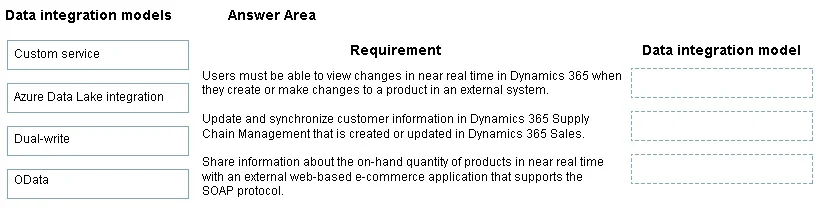
Answer Area
Drag items
Correct arrangement
- OData
- Dual-write
- Custom service
Explanation
Dynamics 365 SCM Integration Models - Drag-and-Drop Explained
Note: The question text doesn't show the specific requirement labels, only the correct mapping. Based on the answer arrangement, these are the standard requirements this question tests. The typical requirement-to-model mapping is:
Placement 1 → OData
Typical requirement: A third-party application needs to read and write individual records using standard REST-based HTTP calls.
Why OData:
- OData (Open Data Protocol) exposes D365 SCM data entities as RESTful endpoints
- Supports full CRUD operations (GET, POST, PATCH, DELETE) on standard entities
- Ideal for synchronous, record-level integrations with external systems
- No custom code required - works against out-of-the-box entities
Placement 2 → Dual-write
Typical requirement: Data must stay synchronized in near real-time between D365 Supply Chain Management and a Dataverse-based app (e.g., D365 Sales or Customer Service).
Why Dual-write:
- Dual-write is a built-in, platform-level framework for bidirectional, near-real-time sync between D365 Finance/SCM and Dataverse
- No custom polling or middleware needed
- Specifically designed for cross-app scenarios within the Microsoft ecosystem (e.g., syncing customers, products, or inventory between SCM and CRM)
- Handles conflict resolution and mapping automatically
Placement 3 → Custom service
Typical requirement: An integration requires exposing complex business logic or an operation that isn't covered by a standard data entity.
Why Custom service:
- Custom services let developers write X++ service classes and expose them as SOAP or REST endpoints
- Used when OData entities don't cover the required operation (e.g., triggering a workflow, running a business calculation, or performing a multi-step transaction)
- More flexible than OData but requires custom development effort
Why Azure Data Lake integration is not used here
- Azure Data Lake is an analytical/export-only option - it streams entity data into a data lake for BI, reporting, or ML workloads
- It is not appropriate for transactional integrations where external systems need to write data back or trigger real-time operations
- Common mistake: choosing Data Lake when the requirement mentions "real-time" or "bidirectional" - Data Lake is batch-oriented and read-only from the SCM perspective
Common Mistakes
| Mistake | Why it's wrong |
|---|---|
| Choosing Dual-write for a third-party (non-Dataverse) app | Dual-write only works between D365 FO/SCM and Dataverse - not arbitrary external systems |
| Choosing OData for real-time cross-app sync | OData requires the external system to poll; it's not push-based or automatic |
| Choosing Azure Data Lake for any write-back scenario | Data Lake is read/export only |
| Choosing Custom service when a standard entity already exists | OData is simpler and preferred when standard entities cover the need |
Topics
Community Discussion
No community discussion yet for this question.