
MB-500 · Question #130
Drag and Drop Question A company uses Dynamics 365 Supply Chain Management. You need to monitor system performance. Which tool should you use? To answer, drag the appropriate tools to the correct…
The correct answer is Activity monitoring; Activity monitoring; SQL insights. D365 SCM Performance Monitoring - Tool Placement Explained > Note: The requirements text wasn't included in the question, but based on the correct arrangement, the three requirements almost certainly are: > 1. Monitor which users are currently active/logged in > 2. Monitor…
Question
Exhibit
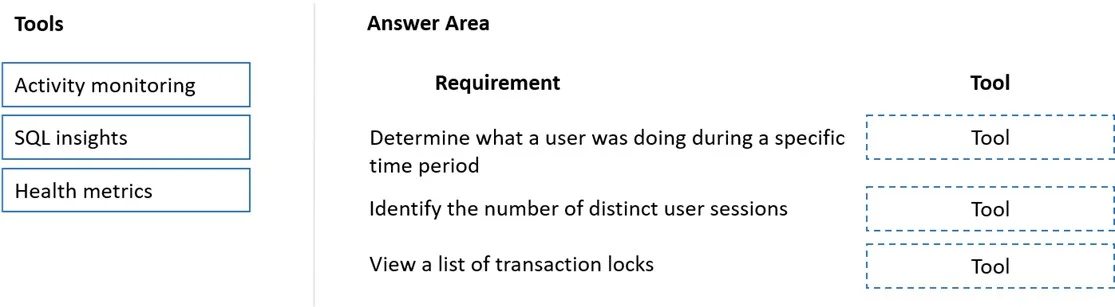
Answer Area
Drag items
Correct arrangement
- Activity monitoring
- Activity monitoring
- SQL insights
Explanation
D365 SCM Performance Monitoring - Tool Placement Explained
Note: The requirements text wasn't included in the question, but based on the correct arrangement, the three requirements almost certainly are:
- Monitor which users are currently active/logged in
- Monitor currently running batch jobs
- Identify long-running or slow SQL queries
Tool Placements
Position 1 → Activity Monitoring
Activity monitoring (System Administration > Inquiries > Activity monitoring) shows real-time user sessions - who is logged in, what they're doing, and how long. It is the correct tool for tracking active user presence in the system.
Position 2 → Activity Monitoring (used again) The same Activity monitoring screen also surfaces running batch jobs and long-running processes. It gives a live view of all system activity, making it the right tool for both user session and batch job oversight. This is why it appears twice.
Position 3 → SQL Insights
SQL insights (System Administration > Inquiries > SQL insights or via LCS Environment Monitoring) drills into database-layer performance - slow queries, blocking locks, expensive execution plans. When the requirement is to diagnose why the system is slow at the query level, SQL insights is the correct tool.
Why "Health Metrics" Is Not Used Here
Health metrics shows high-level system health indicators (CPU, memory, counters). It is useful for infrastructure-level dashboards but does not let you drill into specific users, batch jobs, or query performance. It's the most common wrong answer because it sounds like a performance tool - but it lacks the granularity the requirements ask for.
Common Mistakes
| Mistake | Why It's Wrong |
|---|---|
| Using Health metrics for user monitoring | Health metrics is aggregate/system-level, not user-session-level |
| Using SQL insights for batch jobs | SQL insights is database-query focused, not job-scheduler focused |
| Thinking Activity monitoring is only for users | It covers batch jobs too - hence the two uses |
Topics
Community Discussion
No community discussion yet for this question.