
MB-500 · Question #131
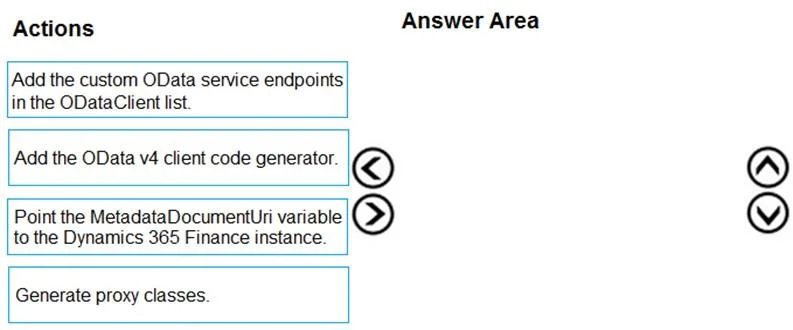
Drag and Drop Question A company implements Dynamics 365 finance and operations apps. You are developing code to consume OData service endpoints. You complete the application registration process…
The correct answer is Add the OData v4 client code generator.; Add the custom OData service endpoints in the ODataClient list; Generate proxy classes.; Point the MetadataDocumentUri variable to the Dynamics 365 Finance instance. Consuming D365 Finance OData in a C# Console App - Step-by-Step Breakdown This question tests your understanding of the setup sequence for an OData v4 client in Visual Studio targeting Dynamics 365 Finance. --- Why This Specific Order The sequence follows a logical tool →…
Question
Exhibit
Answer Area
Drag items
Correct arrangement
- Add the OData v4 client code generator.
- Add the custom OData service endpoints in the ODataClient list
- Generate proxy classes.
- Point the MetadataDocumentUri variable to the Dynamics 365 Finance instance.
Explanation
Consuming D365 Finance OData in a C# Console App - Step-by-Step Breakdown
This question tests your understanding of the setup sequence for an OData v4 client in Visual Studio targeting Dynamics 365 Finance.
Why This Specific Order
The sequence follows a logical tool → configure → generate → wire up pattern. Each step depends on the previous one being complete.
Step-by-Step Breakdown
1. Add the OData v4 client code generator
This installs the Visual Studio connected service extension (e.g., OData Connected Service) via NuGet or the VS Marketplace. This is the prerequisite tool that enables everything else. Nothing else can happen without this installed - you can't configure endpoints or generate classes without the generator present.
2. Add the custom OData service endpoints in the ODataClient list
With the generator installed, you now tell it which OData service endpoints to work with. You register the D365 Finance OData endpoints in the client's configuration list. This must come before generating proxy classes because the generator needs to know what to generate - the endpoints define the scope of the output.
3. Generate proxy classes
With the tool installed and endpoints configured, you trigger code generation. The generator reads the OData $metadata document from the configured endpoints and produces strongly-typed C# proxy classes. This step requires both steps 1 and 2 to be complete first.
4. Point the MetadataDocumentUri variable to the Dynamics 365 Finance instance
After proxy classes are generated, you configure the generated client code to target your specific D365 Finance instance URL. MetadataDocumentUri appears in the generated code, so it logically cannot be set until after generation. This is the runtime wiring step.
Common Mistakes
- Swapping steps 1 and 2: Trying to configure endpoints before installing the generator - the tooling must exist first.
- Putting MetadataDocumentUri before Generate: Candidates assume the URI must be specified upfront (like in a wizard), but in this workflow it's a variable in the generated output that you configure post-generation.
- Skipping endpoint registration: Assuming the generator auto-discovers D365 endpoints - you must explicitly add them to the ODataClient list.
Topics
Community Discussion
No community discussion yet for this question.