
MB-330 · Question #96
SIMULATION You are a functional consultant for a company named Contoso Entertainment System USA (USMF). You plan to manage safety stock level. You need to configure a minimum stock level of 1,500…
The correct answer is A. Select Product information management > Products > Released products and then select the product (StandardSpeakerUpSel), and then on the Action Pane, in the Plan tab, in the Coverage group, select Item coverage to open the Item coverage page. Select Min/Max in for the Coverage code and enter the value 1,500 for the Minimum value. Option A is correct because configuring safety stock (minimum stock levels) in Dynamics 365 Supply Chain Management is done through Item Coverage settings on the released product - specifically by setting the Coverage code to Min/Max and entering the desired minimum quantity…
Question
Exhibit
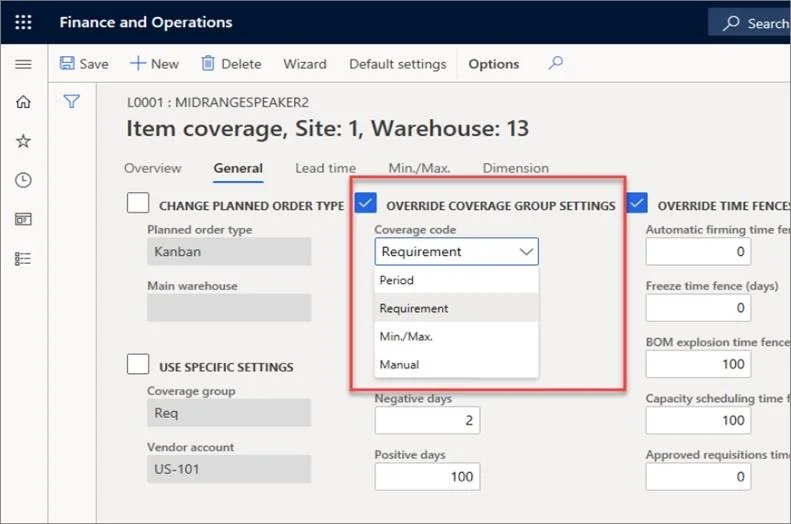
Options
- ASelect Product information management > Products > Released products and then select the product (StandardSpeakerUpSel), and then on the Action Pane, in the Plan tab, in the Coverage group, select Item coverage to open the Item coverage page. Select Min/Max in for the Coverage code and enter the value 1,500 for the Minimum value.
How the community answered
(39 responses)- A100% (39)
Explanation
Option A is correct because configuring safety stock (minimum stock levels) in Dynamics 365 Supply Chain Management is done through Item Coverage settings on the released product - specifically by setting the Coverage code to Min/Max and entering the desired minimum quantity. This path (Product information management > Released products > [item] > Plan tab > Coverage group > Item coverage) is the designated location for defining replenishment rules tied to specific warehouses. Since this is a single-answer simulation with no distractors, the key learning is memorizing the exact navigation path and knowing that Min/Max is the coverage code that unlocks the Minimum value field - other coverage codes (e.g., Period, Requirement) do not expose a minimum unit threshold.
Memory tip: Think "Plan your Min/Max coverage" - the setting lives under the Plan tab, and you must choose Min/Max as the coverage code before the Minimum value field becomes available; skipping that step is the most common mistake.
Topics
Community Discussion
No community discussion yet for this question.