
MB-330 · Question #74
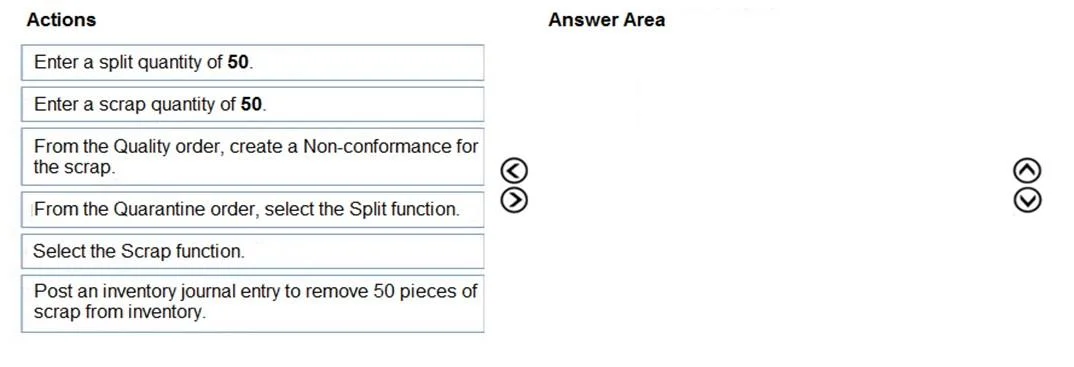
Drag and Drop Question You are the quality supervisor for a company. You receive 100 units of item C0001. You find defects in some units. You move the items to quarantine for further inspection…
The correct answer is From the Quarantine order, select the Split function.; Enter a split quantity of 50; Select the Scrap function.; Enter a scrap quantity of 50. Quality Management Scrapping Process (Dynamics 365 Supply Chain Management) Scenario Context You have 100 units in a single Quarantine Order. Only 50 fail - you cannot scrap all 100, so you must first isolate the 50 failing units before scrapping them. --- Step-by-Step…
Question
Exhibit
Answer Area
Drag items
Correct arrangement
- From the Quarantine order, select the Split function.
- Enter a split quantity of 50
- Select the Scrap function.
- Enter a scrap quantity of 50
Explanation
Quality Management Scrapping Process (Dynamics 365 Supply Chain Management)
Scenario Context
You have 100 units in a single Quarantine Order. Only 50 fail - you cannot scrap all 100, so you must first isolate the 50 failing units before scrapping them.
Step-by-Step Explanation
Step 1 - From the Quarantine order, select the Split function.
You start here because the quarantine order covers all 100 units as a single record. The Split function is the only way to divide one quarantine order into two separate orders (50 good / 50 bad). You cannot scrap a partial quantity without splitting first - the system has no partial-scrap mechanism at the quarantine order level.
Step 2 - Enter a split quantity of 50
This is the immediate follow-up to selecting Split - the system prompts you for how many to split off. You enter 50 (the failing quantity). This creates a second quarantine order containing exactly the 50 defective units you need to scrap. Steps 1 and 2 are a single workflow: action → data entry.
Step 3 - Select the Scrap function.
Now that you have an isolated quarantine order for just the 50 failed units, you invoke Scrap on that order. This tells the system you intend to write these units off - it does not remove inventory yet; it opens the scrap entry screen.
Step 4 - Enter a scrap quantity of 50
The Scrap function prompts for a quantity. Entering 50 confirms the action and triggers the system to remove those units from on-hand inventory and close the quarantine order for those items.
Why the Distractors Are Wrong
| Distractor | Why it's excluded |
|---|---|
| "From the Quality order, create a Non-conformance" | Non-conformance documents the quality problem for reporting/corrective action. It is not part of the scrapping workflow - it's optional and separate. |
| "Post an inventory journal entry to remove 50 pieces" | The Scrap function on the quarantine order handles inventory removal automatically. A manual journal entry would double-count the removal and is not needed. |
Common Mistakes
- Trying to scrap before splitting - You cannot partially scrap a quarantine order; the split must come first.
- Confusing Non-conformance with scrapping - Non-conformance is a quality documentation step, not an inventory transaction.
- Thinking a manual journal entry is required - The quarantine Scrap function is a complete transaction; no separate journal is needed.
Topics
Community Discussion
No community discussion yet for this question.