
MB-330 · Question #73
Drag and Drop Question A company implements warehouse locations in Dynamics 365 Supply Chain Management. You need to configure location directives for inventory movement. Which configurations should…
The correct answer is FEFO batch reservation; Consolidate; Empty location with no incoming work. D365 SCM Location Directive Strategies - Explained Important note: The question as presented is missing the requirements column (the left side of the drag-and-drop). The arrangement order (1, 2, 3) maps strategies to requirements. Based on standard D365 SCM exam format, the…
Question
Exhibit
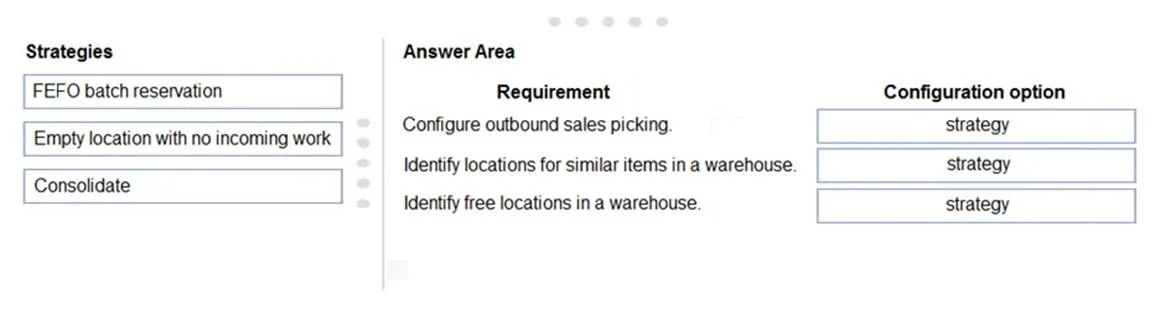
Answer Area
Drag items
Correct arrangement
- FEFO batch reservation
- Consolidate
- Empty location with no incoming work
Explanation
D365 SCM Location Directive Strategies - Explained
Important note: The question as presented is missing the requirements column (the left side of the drag-and-drop). The arrangement order (1, 2, 3) maps strategies to requirements. Based on standard D365 SCM exam format, the implied requirements are:
| # | Requirement (implied) | Strategy |
|---|---|---|
| 1 | Pick batch-tracked items expiring soonest first | FEFO batch reservation |
| 2 | Put away to a location already holding the same item | Consolidate |
| 3 | Put away to a location that is empty and has no pending inbound work | Empty location with no incoming work |
Placement 1: FEFO batch reservation
First Expired, First Out - this strategy is used on pick location directives for batch-tracked items. When selected, the system ranks available locations by the expiration date of the batch held there, ensuring the soonest-to-expire batch is consumed first.
Why here: Any requirement involving perishables, pharma, food, or compliance with expiration-date picking maps exclusively to this strategy. No other strategy considers batch expiry.
Common mistake: Confusing FEFO with FIFO. FIFO (First In, First Out) is about receipt date, not expiration date. FEFO is batch-specific and requires batch tracking to be enabled on the item.
Placement 2: Consolidate
This strategy directs put-away to a location that already contains the same item number. The goal is inventory consolidation - reducing the number of locations holding a given SKU to maximize warehouse density.
Why here: When the requirement is to co-locate like inventory (common in retail/distribution), Consolidate is the correct choice. It won't pick an empty slot; it actively seeks existing stock of the same item.
Common mistake: Thinking Consolidate works for picking - it is a put-away strategy. Also, candidates sometimes confuse it with "Fixed location" assignment, which is a different concept entirely.
Placement 3: Empty location with no incoming work
This strategy finds a location that is:
- Currently empty (no on-hand inventory), AND
- Has no open work directing inventory into it
Why here: If the requirement is to store items in a completely free slot, "Empty location with no incoming work" is more precise than a generic "empty location" strategy. It prevents double-booking a location that is physically empty but already has a pending put-away work order inbound.
Common mistake: Candidates sometimes select "Empty location" (without the "no incoming work" qualifier) and miss that a location can appear empty but still be reserved. The "no incoming work" clause is what makes this strategy warehouse-safe in high-throughput environments.
Key Takeaway
These three strategies cover the three most common location directive use cases in D365 SCM:
- Compliance/perishables → FEFO
- Space optimization (put-away) → Consolidate
- Clean slot reservation (put-away) → Empty location with no incoming work
Topics
Community Discussion
No community discussion yet for this question.