
MB-330 · Question #420
Drag and Drop Question A company uses Dynamics 365 Supply Chain Management for asset management. A specific piece of equipment has a high volume of work orders. You need to identify the costs…
The correct answer is Costing version; Asset management mobile app; Asset consumption report; Item where used page. Explanation: Identifying Asset Repair Costs in D365 Supply Chain Management Important context: This drag-and-drop maps tools to specific requirements (steps/purposes) for identifying repair costs. The question as provided omits the requirements column, so the explanation below…
Question
Exhibit
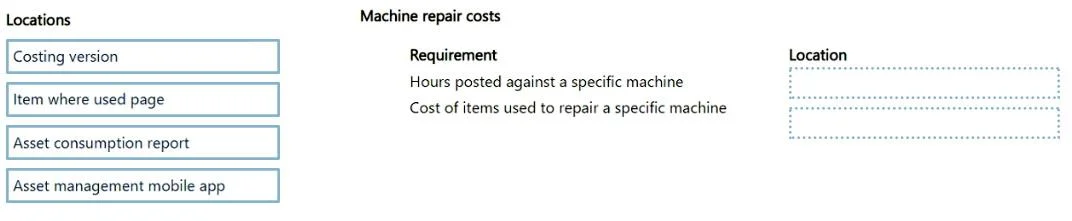
Answer Area
Drag items
Correct arrangement
- Costing version
- Asset management mobile app
- Asset consumption report
- Item where used page
Explanation
Explanation: Identifying Asset Repair Costs in D365 Supply Chain Management
Important context: This drag-and-drop maps tools to specific requirements (steps/purposes) for identifying repair costs. The question as provided omits the requirements column, so the explanation below addresses each item's functional role and why it occupies its position.
Item-by-Item Breakdown
Position 1 - Costing version
- What it is: A container that holds cost price records (standard costs, planned costs) for items and labor rates.
- Why here: Before any cost analysis is meaningful, cost prices must be defined. The costing version establishes the baseline unit costs used to calculate repair expenses. This is a setup/configuration requirement - without it, D365 cannot calculate accurate costs for consumed spare parts or labor on work orders.
- Common mistake: Confusing this with a pricing version (sales-side). Costing versions are purely internal/cost-accounting focused.
Position 2 - Asset management mobile app
- What it is: A mobile interface that allows technicians to log time, material consumption, and notes against work orders in real time.
- Why here: This satisfies the data capture requirement. High-volume work orders mean field technicians are the primary source of consumption data. The mobile app feeds actual labor hours and parts used into work orders, which is the raw input for cost tracking.
- Common mistake: Assuming the desktop client alone captures all costs. For high-volume field repairs, the mobile app is the practical data entry point.
Position 3 - Asset consumption report
- What it is: A built-in report in Asset Management that aggregates hours, items, and expenses consumed across work orders for a specific asset.
- Why here: This is the primary analysis tool for the stated goal - identifying costs. It directly shows what was consumed (parts, labor, expenses) and their associated costs for a given asset or period.
- Common mistake: Overlooking this report in favor of general financial reports. The asset consumption report is purpose-built for this scenario and is more granular than broader cost ledger views.
Position 4 - Item where used page
- What it is: A lookup that shows everywhere a specific spare part/item appears - across BOMs, work orders, assets, etc.
- Why here: This satisfies a reverse-lookup requirement: identifying which repairs consumed a particular item (e.g., a specific bearing or seal). Useful when you want to understand costs from the item's perspective rather than the asset's perspective.
- Common mistake: Using this as the primary cost tool - it shows where an item is used, not the total cost summary. It supplements the consumption report rather than replacing it.
Workflow Summary
| Position | Tool | Purpose |
|---|---|---|
| 1 | Costing version | Define cost rates/prices |
| 2 | Mobile app | Capture actual consumption |
| 3 | Asset consumption report | Analyze total repair costs |
| 4 | Item where used page | Trace costs by specific part |
The arrangement follows a logical flow: configure → capture → analyze → investigate.
Topics
Community Discussion
No community discussion yet for this question.