
MB-330 · Question #399
Drag and Drop Question A company is implementing Dynamics 365 Supply Chain Management. The company has vendor agreements with domestic and international companies. A production controller requires…
The correct answer is Shipping container; Folio; Purchase order. Dynamics 365 Supply Chain Management - Landed Cost Module: Inbound Shipment Configuration This question is about the Landed Cost module in D365 SCM, which manages goods-in-transit tracking and cost allocation for inbound shipments. The module uses a four-level hierarchy: >…
Question
Exhibit
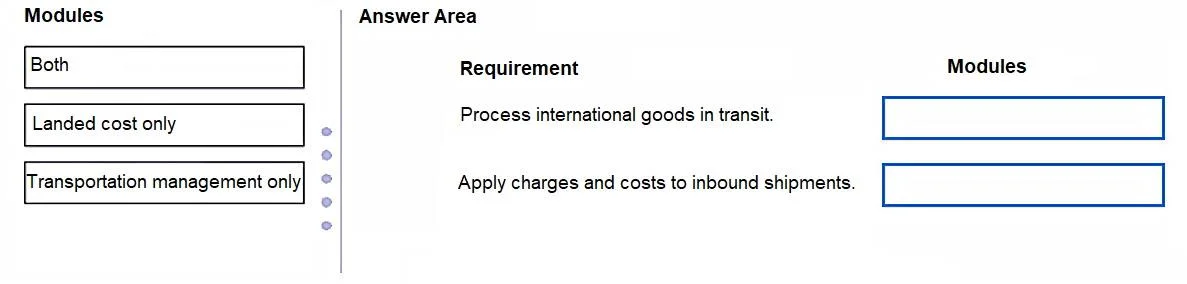
Answer Area
Drag items
Correct arrangement
- Shipping container
- Folio
- Purchase order
Explanation
Dynamics 365 Supply Chain Management - Landed Cost Module: Inbound Shipment Configuration
This question is about the Landed Cost module in D365 SCM, which manages goods-in-transit tracking and cost allocation for inbound shipments. The module uses a four-level hierarchy:
Voyage → Shipping Container → Folio → Purchase Order
The three positions map to three distinct requirements within that hierarchy.
Position 1: Shipping Container
Requirement: Process goods in transit from international vendors.
A Shipping Container represents a physical container within a voyage. It is the correct level for tracking goods physically moving from international vendors to your warehouse. When a production controller needs visibility into what is in transit and when it arrives, they work at the shipping container level. It ties physical movement to the voyage and enables transit tracking per container.
Common mistake: Confusing this with a "voyage." A voyage is the overall journey (the ship/flight); the shipping container is what sits inside that voyage. You operate at the container level when tracking specific physical goods.
Position 2: Folio
Requirement: Charges and costs applied to both domestic and international inbound shipments.
A Folio is an administrative/customs grouping within a shipping container. It is specifically designed to distribute landed costs (duties, freight, insurance, etc.) across purchase orders. Because the requirement says charges must be applied to both domestic and international shipments, the folio is the right level - it allows cost allocation regardless of origin type and is the standard vehicle for customs-related charge distribution.
Common mistake: Trying to apply charges at the voyage or shipping container level alone. Folios exist precisely to handle the cost-split across POs in a customs/compliance context, especially when shipment origins differ (domestic vs. international).
Position 3: Purchase Order
Requirement: Separate purchase orders; no automatic inbound load creation.
When the company will not create inbound loads automatically (a Transportation Management Module feature), the lowest actionable unit in Landed Cost is the Purchase Order. Each PO is added individually to the voyage/container/folio structure. Costs ultimately get allocated down to the PO (and PO line) level for accurate costing per item received.
Common mistake: Assuming that without auto-loads you need a different module entirely. Landed Cost deliberately bypasses TMS auto-load creation - POs are added manually to the voyage structure, which satisfies the "separate purchase orders" and "no automatic inbound loads" requirements simultaneously.
Summary Table
| Position | Module | Why |
|---|---|---|
| 1 | Shipping Container | Tracks physical goods in transit from international vendors |
| 2 | Folio | Allocates charges/costs across domestic & international POs |
| 3 | Purchase Order | Handles separate POs without auto inbound load creation |
The key insight is that Landed Cost is the module being configured, and these three objects are its sub-components used at different levels of the hierarchy to satisfy each distinct business requirement.
Topics
Community Discussion
No community discussion yet for this question.