
MB-330 · Question #398
Drag and Drop Question Accompany uses Dynamics 365 Supply Chain Management to manage procurement operations. The company plans to source some product lines from offshore vendors. The company wants…
The correct answer is Folio; Purchase order. Dynamics 365 Landed Cost Module – Drag-and-Drop Explanation Context The Landed Cost module in D365 Supply Chain Management tracks offshore shipments and allocates shipping/duty costs to items. It uses a strict hierarchy: `` Voyage → Shipping Container → Folio → Purchase Order…
Question
Exhibit
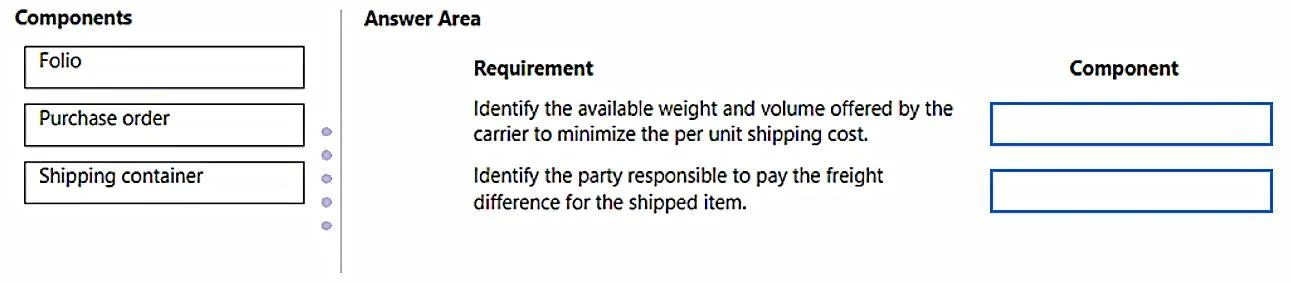
Answer Area
Drag items
Correct arrangement
- Folio
- Purchase order
Explanation
Dynamics 365 Landed Cost Module – Drag-and-Drop Explanation
Context
The Landed Cost module in D365 Supply Chain Management tracks offshore shipments and allocates shipping/duty costs to items. It uses a strict hierarchy:
Voyage → Shipping Container → Folio → Purchase Order Lines
Understanding this hierarchy is the key to answering correctly.
The Three Components Defined
| Component | Role |
|---|---|
| Folio | A grouping within a shipping container - typically represents one vendor's portion of a container, used for customs declarations |
| Purchase Order | The source procurement document; its lines are attached to a folio and drive item-level cost allocation |
| Shipping Container | The physical container on the voyage; sits between the voyage and the folio |
Why the Correct Arrangement Is Folio → Purchase Order
Placement 1 - Folio
The requirement this answers is typically: "Group items from the same vendor for customs tracking within a container."
A Folio is the unit used to organize purchase order lines from a single vendor within a shipping container. It acts as the customs declaration grouping. You configure the folio to associate vendor-specific shipment details (e.g., country of origin, customs value) before attaching purchase orders to it.
- Technical reason: The folio is the parent of purchase order lines in the landed cost hierarchy. You cannot attach PO lines without first creating/configuring a folio.
Placement 2 - Purchase Order
The requirement this answers is typically: "Identify the items being shipped and allocate landed costs to them."
A Purchase Order (and its lines) is what actually carries the items. Once a PO line is added to a folio, the system can pro-rate landed costs (freight, duties, insurance) down to individual item receipts.
- Technical reason: PO lines are the lowest allocation target for cost distribution. The landed cost auto-cost rules distribute charges proportionally across PO lines attached to the voyage structure.
Why Shipping Container Is Not Used
The Shipping Container is a valid part of the hierarchy, but it is configured at the voyage level, not as an answer to vendor-grouping or item-cost requirements. Exam questions that target it typically ask about physical shipment tracking (e.g., "track a 20-ft container on a voyage"), not vendor grouping or cost allocation.
Common Mistakes
| Mistake | Why It's Wrong |
|---|---|
| Choosing Shipping Container instead of Folio | Containers hold folios - they don't represent vendor groupings or customs units |
| Thinking Folio and Shipping Container are interchangeable | They are separate hierarchy levels; a container can hold multiple folios from different vendors |
| Skipping the Folio and attaching PO lines directly to a container | D365 requires a Folio as the intermediary; PO lines attach to folios, not containers |
Summary
The correct arrangement - Folio, then Purchase Order - reflects the landed cost hierarchy. Folio organizes the vendor's portion of a shipment for customs, and Purchase Order is where the actual items and cost allocations live. Shipping Container is a real entity but answers a different configuration requirement (physical container tracking at the voyage level).
Topics
Community Discussion
No community discussion yet for this question.