
MB-330 · Question #390
Drag and Drop Question A manufacturing company uses Dynamics 365 Supply Chain Management. The company wants to change inventory valuation to standard costing. Manufactured items must have an active…
The correct answer is Sub ledger; Per cost group. D365 SCM Standard Costing Inventory Parameters The Two Parameters Being Configured The question targets two distinct inventory management parameters related to standard costing setup: | Parameter | Correct Value | |---|---| | Cost breakdown | Sub ledger | | Production variance…
Question
Exhibit
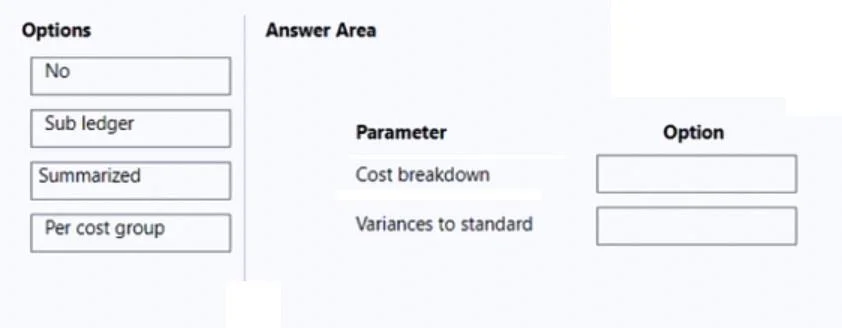
Answer Area
Drag items
Correct arrangement
- Sub ledger
- Per cost group
Explanation
D365 SCM Standard Costing Inventory Parameters
The Two Parameters Being Configured
The question targets two distinct inventory management parameters related to standard costing setup:
| Parameter | Correct Value |
|---|---|
| Cost breakdown | Sub ledger |
| Production variance (substitutions) | Per cost group |
Placement 1: Cost Breakdown → Sub ledger
Why: The requirement states items need an active cost breakdown in total. "Sub ledger" activates cost breakdown tracking at the subledger journal level, which produces a summarized/total view of cost components without splitting them individually by cost group.
- "No" would mean no active cost breakdown at all - disqualified because the requirement explicitly says "active."
- "Per cost group" would break costs down per category (material, labor, overhead), which contradicts "in total."
- "Sub ledger" is the middle ground: costs are tracked and visible in the subledger, but rolled up as a total - matching the requirement precisely.
Placement 2: Production Variance → Per cost group
Why: The requirement says the system must still capture the variance amount on production substitutions. When a raw material is substituted during production (e.g., a different component is used than what the BOM specifies), that substitution creates a cost difference.
Setting variance to "Per cost group" tells the system to post and track those variance amounts broken out by cost group type (e.g., direct material vs. labor), making substitution variances identifiable and auditable.
- "Summarized" would lump all variances together, making substitution-specific variances invisible.
- "No" would suppress variance posting entirely - the variance would not be captured at all.
Common Mistakes
- Confusing "in total" with "No" - "In total" means a rolled-up active breakdown, not the absence of one. "No" disables the feature entirely.
- Choosing "Per cost group" for the cost breakdown - This gives more granularity than required; the spec says total, not by cost group.
- Choosing "Summarized" for variance - "Summarized" collapses all variances, which hides which variances came from substitutions vs. other production differences.
- Treating both parameters as the same - These govern two separate functions: how costs are broken down vs. how variances are posted. Each has its own business requirement here.
Topics
Community Discussion
No community discussion yet for this question.