
MB-330 · Question #316
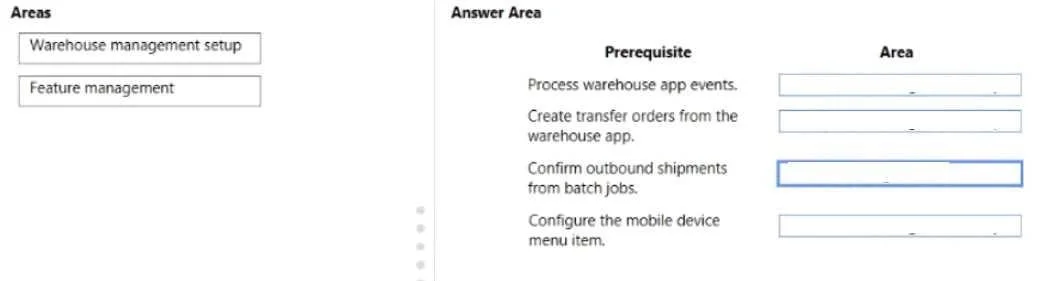
Drag and Drop Question A distribution company uses Dynamics 365 Supply Chain Management. Users in the warehouse must have the ability to create process transfer orders from a mobile device. You need…
The correct answer is Feature management; Warehouse management setup; Warehouse management setup; Feature management. D365 SCM: Processing Transfer Orders from Mobile Device Setup The Configuration Sequence To enable warehouse users to create and process transfer orders from the Warehouse Management mobile app, you follow this specific order: --- Position 1 - Feature Management Why first…
Question
Exhibit
Answer Area
Drag items
Correct arrangement
- Feature management
- Warehouse management setup
- Warehouse management setup
- Feature management
Explanation
D365 SCM: Processing Transfer Orders from Mobile Device Setup
The Configuration Sequence
To enable warehouse users to create and process transfer orders from the Warehouse Management mobile app, you follow this specific order:
Position 1 - Feature Management
Why first: Before anything can be configured in the warehouse module, the underlying feature must be enabled. Specifically, you activate "Create and process transfer orders from the warehouse app" (and potentially the "Transfer order lines in inventory transactions" feature) in System administration > Feature management.
Features must be enabled before their corresponding configuration options appear in the UI. Trying to configure warehouse settings for a disabled feature will result in missing menus or options.
Position 2 - Warehouse Management Setup
Why second: With the feature enabled, you now configure Warehouse management parameters - specifically enabling the "Create transfer order from warehouse app" setting under Warehouse management > Setup > Warehouse management parameters.
This unlocks the functional behavior at the system level.
Position 3 - Warehouse Management Setup
Why third: Next, you configure the mobile device menu items - adding a new menu item of type Process for transfer orders, then adding it to the appropriate mobile device menu under Warehouse management > Setup > Mobile device.
This step depends on Position 2 being complete, as the transfer order options only appear after parameters are set.
Position 4 - Feature Management
Why last: A second feature flag - typically "Outbound shipment events" or "Transfer order receiving" - may need to be enabled to complete the end-to-end flow (e.g., receiving the transfer on the destination warehouse side via mobile). This is enabled last because it depends on the warehouse setup being in place to function correctly.
Common Mistakes
| Mistake | Why it fails |
|---|---|
| Configuring mobile menus before enabling the feature | Menu options for transfer orders won't appear |
| Skipping warehouse parameters and going straight to mobile menus | The option to link transfer orders won't be available |
| Forgetting the second Feature Management step | Receiving side of the transfer order won't work on mobile |
| Doing both Feature Management steps first | Technically works for enabling, but the setup steps still depend on each other sequentially |
Key principle: Feature Management gates access to configuration options. Always enable the feature flag before attempting to configure its dependent settings in Warehouse management setup.
Topics
Community Discussion
No community discussion yet for this question.