
MB-330 · Question #315
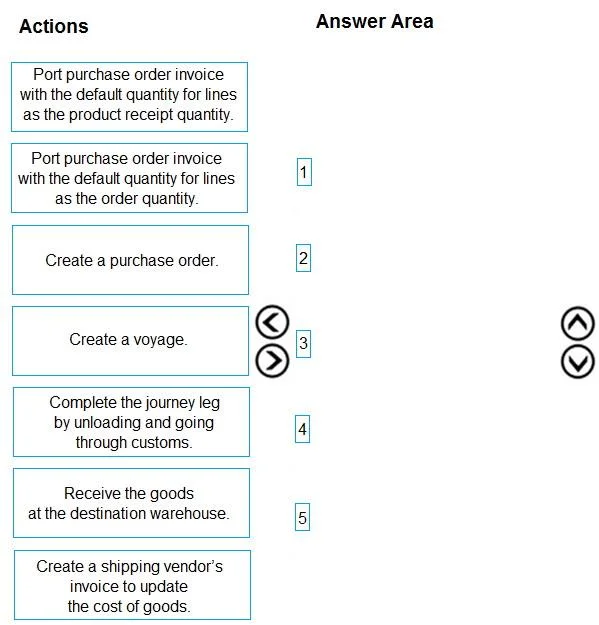
Drag and Drop Question A company uses Dynamics 365 Supply Chain Management to manage procurement operations. A purchasing clerk must process a purchasing request from an offshore vendor with the…
The correct answer is Create a voyage.; Create a purchase order.; Port purchase order invoice with the default quantity for lines as the order quantity.; Create a shipping vendor's invoice to update the cost of goods.; Receive the goods at the destination warehouse. D365 Supply Chain Management: Landed Cost Process Walkthrough What Is Landed Cost? Landed cost is the total cost of a product delivered to your warehouse - including purchase price, freight, insurance, customs duties, and port fees. In D365 SCM, the Landed Cost module tracks…
Question
Exhibit
Answer Area
Drag items
Correct arrangement
- Create a voyage.
- Create a purchase order.
- Port purchase order invoice with the default quantity for lines as the order quantity.
- Create a shipping vendor's invoice to update the cost of goods.
- Receive the goods at the destination warehouse.
Explanation
D365 Supply Chain Management: Landed Cost Process Walkthrough
What Is Landed Cost?
Landed cost is the total cost of a product delivered to your warehouse - including purchase price, freight, insurance, customs duties, and port fees. In D365 SCM, the Landed Cost module tracks offshore shipments through a "voyage" structure that links purchase orders to their associated freight costs.
Why This Specific Order
Step 1: Create a Voyage
Reason: A voyage is the parent container for everything else - it defines the shipping route, legs (origin port → transit → destination port), and the cost structure. You must create it first because the purchase order will be attached to the voyage, not the other way around. Creating a voyage without a PO is valid; creating a PO without a voyage means you have no structure to track costs and transit.
Common mistake: Trying to create the PO first and add it to a voyage later. While technically possible in some configurations, best practice is voyage first to ensure all auto-costs and routing rules apply from the start.
Step 2: Create a Purchase Order
Reason: Once the voyage exists, you create the PO and link it to the voyage. The voyage auto-costs (freight estimates, insurance, etc.) then attach to the PO lines. The PO represents your agreement with the offshore vendor.
Common mistake: Forgetting to link the PO to the voyage during creation, which breaks the cost tracking chain.
Step 3: Post PO Invoice - Default Quantity = Order Quantity
Reason: This is the most technically nuanced step. You are invoicing the vendor before the goods physically arrive (they're still on a ship). Because there is no product receipt yet, you cannot use "product receipt quantity" (there's nothing received to match against). You use order quantity to match the vendor's invoice for the full shipment.
Why not "product receipt quantity"? That option only works if goods have been received first. Using it here would result in a zero or partial invoice, misrepresenting the liability. This is the most common mistake candidates make - confusing it with the standard domestic procurement flow where goods arrive before the invoice.
Step 4: Create a Shipping Vendor's Invoice to Update the Cost of Goods
Reason: The offshore vendor's PO invoice covers the purchase price. But landed cost also includes freight, insurance, and duties - charged by a separate shipping/logistics vendor. This invoice posts the additional charges and updates the inventory value of the goods to reflect their true landed cost. It must come before physical receipt so the goods post to inventory at the correct, fully-loaded cost.
Common mistake: Assuming the PO invoice covers all costs. Skipping this step means inventory is undervalued and cost of goods sold (COGS) will be incorrect.
Step 5: Receive Goods at the Destination Warehouse
Reason: Physical receipt is the final step. By this point, the voyage is set up, the PO is confirmed, the vendor's invoice is posted, and the landed costs are applied. Receiving the goods now posts them to inventory at the correct landed cost value. Posting receipt before the shipping vendor's invoice would post inventory at purchase price only - you'd need costly inventory adjustments later.
Common mistake: Processing the product receipt early to "confirm" goods arrived, then trying to add landed costs after the fact. D365 allows this but it creates accounting corrections and complicates cost accuracy.
Why the Unused Items Were Excluded
| Excluded Item | Why Not Included |
|---|---|
| PO Invoice with product receipt quantity | No receipt exists yet; this option would fail or produce incorrect results for in-transit goods |
| Complete journey leg (unloading/customs) | This is a voyage tracking/status action, not a core accounting step; it's managed within the voyage but isn't one of the five primary procurement actions the clerk performs |
Summary Flow
Voyage (structure) → PO (commitment) → Vendor Invoice/Order Qty (liability)
→ Shipping Invoice (landed cost) → Warehouse Receipt (inventory)
The key principle: establish the cost structure before posting inventory, so goods arrive in the system at their true cost without post-receipt adjustments.
Topics
Community Discussion
No community discussion yet for this question.