
MB-310 · Question #408
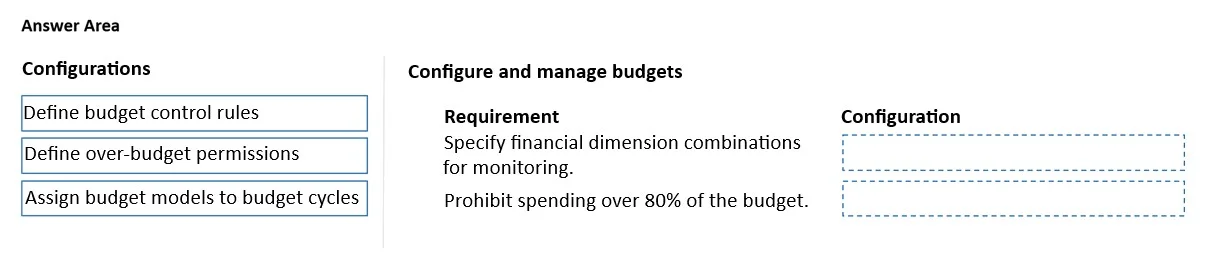
Drag and Drop Question A company uses Dynamics 365 Finance to manage budgeting. The company has the following system requirements: - Monitor the range of expenditures for the sales department across…
The correct answer is Define budget control rules; Define over-budget permissions. Dynamics 365 Finance - Budget Control Configuration The Two Requirements and Their Matches --- Requirement 1: Monitor expenditures for the sales department across a specific subset of financial dimensions → Define budget control rules Budget control rules define which financial…
Question
Exhibit
Answer Area
Drag items
Correct arrangement
- Define budget control rules
- Define over-budget permissions
Explanation
Dynamics 365 Finance - Budget Control Configuration
The Two Requirements and Their Matches
Requirement 1: Monitor expenditures for the sales department across a specific subset of financial dimensions → Define budget control rules
Budget control rules define which financial dimension combinations are subject to budget checking. In D365 Finance, you configure rules that target specific account structures, departments (like Sales), and dimension value combinations. This is precisely the mechanism that lets you scope budget monitoring to a subset of dimensions rather than applying it globally. Without a budget control rule targeting the sales department's relevant dimensions, the system has no basis for tracking or enforcing spend in that context.
Requirement 2: Prohibit purchasing agents from spending more than 80% of the budget → Define over-budget permissions
Over-budget permissions control who can exceed a budget threshold and by how much. In D365 Finance, you set a percentage threshold (e.g., 80%) and assign permission groups - users not in a permitted group are blocked when a transaction would push spend past that threshold. Setting this to 80% with purchasing agents excluded from override permissions directly enforces the prohibition described. This is distinct from simply tracking spend; it actively blocks the transaction.
Why "Assign budget models to budget cycles" is not used
Budget models and budget cycle assignments are foundational prerequisite setup - they establish the time period and planning structure for budgets. They don't control which dimensions are monitored nor who is blocked at what percentage. This is the common distractor: students conflate general budget setup with the targeted configuration needed for rules and permissions.
Common Misconceptions
- Conflating budget models with budget control rules: Budget models hold the numbers; budget control rules define enforcement scope and conditions - they are separate concepts.
- Thinking over-budget permissions are "allow" only: They are bidirectional - you define who can go over, meaning anyone not in that group is implicitly prohibited, which is exactly how the 80% block is implemented.
Topics
Community Discussion
No community discussion yet for this question.