
MB-310 · Question #303
Drag and Drop Question A company uses basic budgeting functionality in Dynamics 365 Finance. The company has four sales territories in the same legal entity. Each territory uses its own budget…
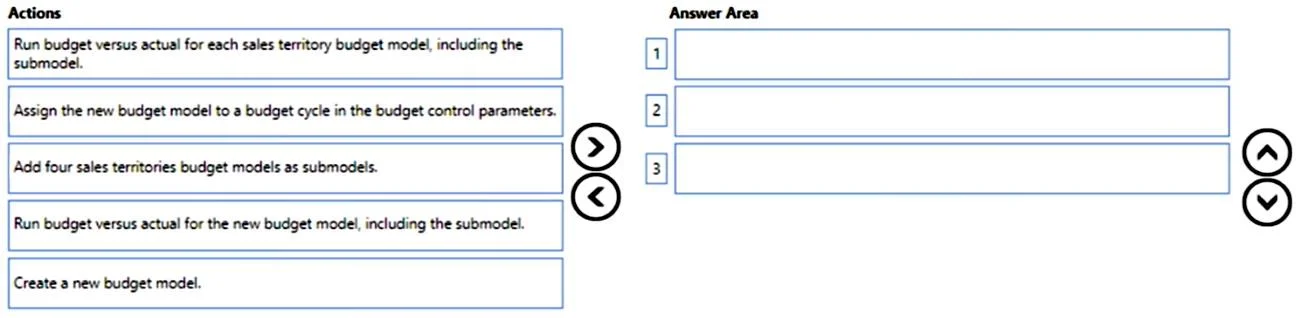
The correct answer is Create a new budget model.; Add four sales territories budget models as submodels.; Run budget versus actual for the new budget model, including the submodel. Dynamics 365 Finance - Basic Budgeting: Consolidated Budget vs. Actual The Core Concept In D365 Finance basic budgeting, a budget model is the container for budget register entries. Budget models support a parent-child (submodel) hierarchy - when you run the Budget vs. Actual…
Question
Exhibit
Answer Area
Drag items
Correct arrangement
- Create a new budget model.
- Add four sales territories budget models as submodels.
- Run budget versus actual for the new budget model, including the submodel.
Explanation
Dynamics 365 Finance - Basic Budgeting: Consolidated Budget vs. Actual
The Core Concept
In D365 Finance basic budgeting, a budget model is the container for budget register entries. Budget models support a parent-child (submodel) hierarchy - when you run the Budget vs. Actual inquiry against a parent model and check "Include submodel," the system aggregates data from the parent AND all its children in one view.
The goal here: view all four territories' budgets in a single inquiry, not four separate ones.
Step-by-Step Breakdown
Step 1 - Create a new budget model
Why first: You need a new parent (umbrella) model to serve as the aggregation point. The four existing territory models have no common parent yet, so there is nothing to attach submodels to. This is always the prerequisite - you cannot assign submodels without an existing parent model to receive them.
Step 2 - Add four sales territory budget models as submodels
Why second: Now that the parent model exists, you attach each territory's budget model to it as a submodel (child). This creates the hierarchy:
New Parent Model
├── Territory 1 Budget Model
├── Territory 2 Budget Model
├── Territory 3 Budget Model
└── Territory 4 Budget Model
This step must come after Step 1 (parent must exist) and before Step 3 (the relationship must be in place before you run the inquiry).
Step 3 - Run budget versus actual for the new budget model, including the submodel
Why third: With the hierarchy established, you run the inquiry against the parent model with the "Include submodel" flag checked. The system rolls up all four territory budgets and their actuals into one consolidated view - the single inquiry the users need.
Why the Rejected Options Are Wrong
| Rejected Option | Why It Fails |
|---|---|
| Run budget vs. actual for each territory model, including the submodel | This produces four separate inquiries, not one consolidated view. It defeats the stated requirement. |
| Assign the new budget model to a budget cycle in the budget control parameters | This is a budget control (funds control/encumbrance) configuration step. The question explicitly states the company uses basic budgeting - budget control parameters are a different module entirely. This is the most common trap answer. |
Common Mistakes / Misconceptions
-
Confusing basic budgeting with budget control. Budget control has its own parameters (budget cycle, threshold rules, etc.). Basic budgeting does not require assigning a model to a budget cycle parameter - that option is a red herring designed to catch candidates who conflate the two features.
-
Skipping the parent model and trying to run a combined report directly. You cannot combine unrelated sibling models in a single inquiry without a parent. The submodel hierarchy is the only mechanism for consolidation in basic budgeting.
-
Running Step 3 before Step 2. If you run the inquiry on the new parent before attaching the territory models as submodels, you get an empty or parent-only result. The hierarchy must be complete first.
Topics
Community Discussion
No community discussion yet for this question.