
MB-310 · Question #287
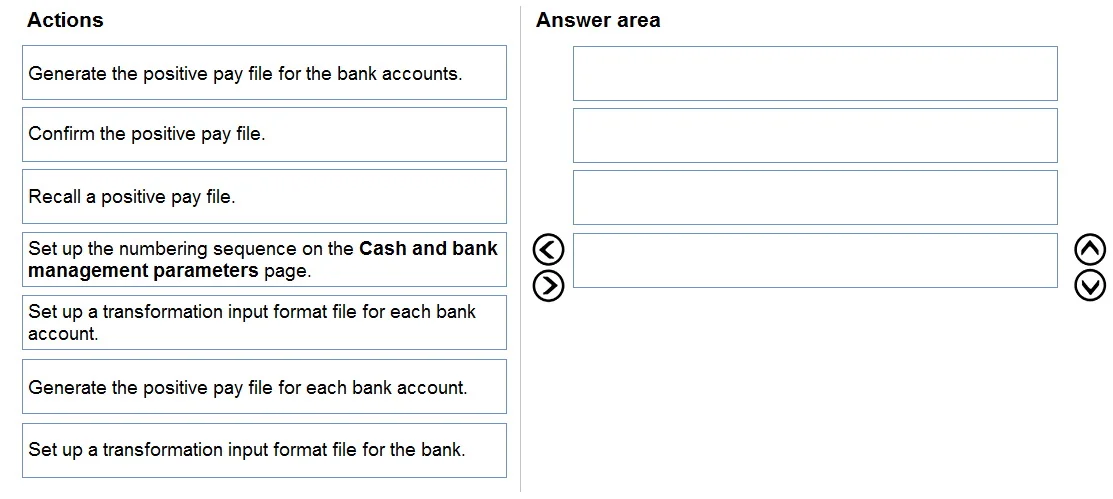
Drag and Drop Question A company is implementing Dynamics 365 Finance. The company maintains two different bank accounts from the same bank. You need to set up and generate positive pay for the bank…
The correct answer is Set up a transformation input format file for the bank.; Set up the numbering sequence on the Cash and bank management parameters page.; Generate the positive pay file for each bank account.; Confirm the positive pay file. Dynamics 365 Finance: Positive Pay Setup - Explained What is Positive Pay? Positive pay is a bank fraud prevention feature. Your company sends the bank a file listing all authorized payments. The bank rejects any check not on the list. The setup sequence must follow a logical…
Question
Exhibit
Answer Area
Drag items
Correct arrangement
- Set up a transformation input format file for the bank.
- Set up the numbering sequence on the Cash and bank management parameters page.
- Generate the positive pay file for each bank account.
- Confirm the positive pay file.
Explanation
Dynamics 365 Finance: Positive Pay Setup - Explained
What is Positive Pay?
Positive pay is a bank fraud prevention feature. Your company sends the bank a file listing all authorized payments. The bank rejects any check not on the list. The setup sequence must follow a logical dependency chain: configure → number → generate → confirm.
Why This Specific Order
Step 1: Set up a transformation input format file for the bank
Why first: This XSLT file tells D365 how to format the positive pay data in the structure your bank expects. Nothing else can be configured or generated without this format existing.
Critical distinction - common mistake: The question says the two accounts are at the same bank. Therefore you need one transformation file at the bank level, not one per account. The distractor item "Set up a transformation input format file for each bank account" is wrong precisely because both accounts share the same bank format. One file covers both.
Step 2: Set up the numbering sequence on the Cash and bank management parameters page
Why second: Each positive pay file must carry a unique sequential number for audit tracking and bank reconciliation. This is a system-wide parameter that must exist before any file is generated, because the generation process pulls from this sequence automatically. Skipping this means files cannot be numbered, so generation fails or produces invalid output.
Step 3: Generate the positive pay file for each bank account
Why third: With the format and numbering in place, you can now generate the actual files. Because there are two separate bank accounts, you run the generation process once per account - producing two distinct files.
Common mistake: The distractor "Generate the positive pay file for the bank accounts" implies a single bulk generation. The correct answer specifies "for each" because each account's payments are tracked independently and submitted as separate files.
Step 4: Confirm the positive pay file
Why last: Confirmation is the final submission step. It locks the file, marks it as sent, and prevents further modification. You cannot confirm before generating, and this step is what formally commits the data to the bank.
Why the Other Items Are Excluded
| Item | Why Excluded |
|---|---|
| Recall a positive pay file | This reverses an already-sent file - it's a corrective action, not part of initial setup/generation. |
| Set up a transformation input format file for each bank account | Both accounts belong to the same bank, so one bank-level format covers both. Per-account files would be redundant. |
| Generate the positive pay file for the bank accounts (single action) | Conflicts with the requirement to handle each account individually. |
Key Takeaway
The order reflects hard dependencies: format must exist → numbering must exist → generation can run → confirmation closes the loop. The bank-level (not per-account) transformation file is the most common trap - always check whether accounts share a bank before deciding the scope of configuration.
Topics
Community Discussion
No community discussion yet for this question.